[3.4.0 PD-612] Dossierflow – Bestemmingsdocumenten niet verwijderen
Dossierflow – Bestemmingsdocumenten niet verwijderen
Status: Gereed | Impact: Hoog | Releasenummer: 3.4.0 | Sprintnummer: QN 26-17 | Jira ticketnummer: PD-612
beschikbaar op POC vanaf 18/09/2026 |
beschikbaar op Productie vanaf 02/10/2026
Bekijk "[3.4.0 PD-612] Dossierflow – Bestemmingsdocumenten niet verwijderen"
[3.4.0 PD-412] Dossierflow – Sortering van keurders niet ok
Dossierflow – Sortering van keurders niet ok
Status: Gereed | Impact: Hoog | Releasenummer: 3.4.0 | Sprintnummer: QN 26-17 | Jira ticketnummer: PD-412
beschikbaar op POC vanaf 18/09/2026 |
beschikbaar op Productie vanaf 02/10/2026
Bekijk "[3.4.0 PD-412] Dossierflow – Sortering van keurders niet ok"
[3.4.0 PD-353] Moties in agenda kunnen creëren
Moties in agenda kunnen creëren
Status: Gereed | Impact: Hoog | Releasenummer: 3.4.0 | Sprintnummer: QN 26-17 | Jira ticketnummer: PD-353
beschikbaar op POC vanaf 18/09/2026 |
beschikbaar op Productie vanaf 02/10/2026
Bekijk "[3.4.0 PD-353] Moties in agenda kunnen creëren"
[3.3.4 PD-571] DossierFlow - Tellers verbeterd bij Dossier Afdeling
DossierFlow – Tellers verbeterd bij Dossier Afdeling.
Status: Gereed | Impact: Hoog | Releasenummer: 3.3.4 | Sprintnummer: QN 26-14 | Jira ticketnummer: PD-571
beschikbaar op POC vanaf 21/08/2026 |
beschikbaar op Productie vanaf 04/09/2026
Bekijk "[3.3.4 PD-571] DossierFlow – Tellers verbeterd bij Dossier Afdeling"
[3.3.1 PD-450] (Video) Wanneer veld 'partij' leeg is, toon leeg veld bij 'aan het woord'
Wanneer er een persoon zonder partij aan het woord is, zal er nu een leeg veld worden getoond waar normaal gesproken partij werd ingevuld.
Status: Gereed | Impact: Laag | Releasenummer: 3.3.1 | Sprintnummer: QN 26-11 | Jira ticketnummer: PD-450
beschikbaar op POC vanaf 26/06/2026 |
beschikbaar op Productie vanaf 14/08/2026
Bekijk "[3.3.1 PD-450] (Video) Wanneer veld ‘partij’ leeg is, toon leeg veld bij ‘aan het woord’"
[3.3.3 PD-524] Motie editor heeft aanpassingen nodig
Motie editor heeft aanpassingen nodig
Status: Gereed | Impact: Hoog | Releasenummer: 3.3.3 | Sprintnummer: QN 26-13 | Jira ticketnummer: PD-524
beschikbaar op POC vanaf 24/07/2026 |
beschikbaar op Productie vanaf 14/08/2026
Bekijk "[3.3.3 PD-524] Motie editor heeft aanpassingen nodig"
[3.3.3 PD-497] Besluit soorten per vergader categorie bepalen
Besluit soorten per vergader categorie bepalen
Status: Gereed | Impact: Hoog | Releasenummer: 3.3.3 | Sprintnummer: QN 26-13 | Jira ticketnummer: PD-497
beschikbaar op POC vanaf 24/07/2026 |
beschikbaar op Productie vanaf 07/08/2026
Bekijk "[3.3.3 PD-497] Besluit soorten per vergader categorie bepalen"
[3.3.1 PD-448] Lijst PDF Toezeggingen - Publiek verbeterde lay-out
De weergave van de PDF-uitdraai is verbeterd voor de module Toezeggingen.
Status: Gereed | Impact: Laag | Releasenummer: 3.3.1 | Sprintnummer: QN 26-11 | Jira ticketnummer: PD-448
beschikbaar op POC vanaf 26/06/2026 |
beschikbaar op Productie vanaf 10/07/2026
Bekijk "[3.3.1 PD-448] Lijst PDF Toezeggingen – Publiek verbeterde lay-out"
[3.2.6 PD-272] Technische vraag vertrouwelijk kunnen maken.
Technische vraag vertrouwelijk kunnen maken.
Status: Gereed | Impact: Hoog | Releasenummer: 3.2.6 | Sprintnummer: QN 26-09 | Jira ticketnummer: PD-272
beschikbaar op POC vanaf 29/05/2026 |
beschikbaar op Productie vanaf 12/06/2026
Bekijk "[3.2.6 PD-272] Technische vraag vertrouwelijk kunnen maken."
[3.2.6 PD-374] Extra button (voeg meerdere toe) bij collegeberichten
Extra button (voeg meerdere toe) bij collegeberichten
Status: Gereed | Impact: Hoog | Releasenummer: 3.2.6 | Sprintnummer: QN 26-09 | Jira ticketnummer: PD-374
beschikbaar op POC vanaf 29/05/2026 |
beschikbaar op Productie vanaf 12/06/2026
Bekijk "[3.2.6 PD-374] Extra button (voeg meerdere toe) bij collegeberichten"
[3.2.5 PD-87] Informatie ‘I’ ook zichtbaar voor publiek
Informatie ‘I’ ook zichtbaar voor publiek
Status: Gereed | Impact: Hoog | Releasenummer: 3.2.5 | Sprintnummer: QN 26-08 | Jira ticketnummer: PD-87
beschikbaar op POC vanaf 15/05/2026 |
beschikbaar op Productie vanaf 29/05/2026
Bekijk "[3.2.5 PD-87] Informatie ‘I’ ook zichtbaar voor publiek"
[3.2.3 PD-186] DossierFlow- Prematuur - Document naar PDF
DossierFlow- Prematuur – Document naar PDF
Status: Gereed | Impact: Hoog | Releasenummer: 3.2.3 | Sprintnummer: QN 26-08 | Jira ticketnummer: PD-186
beschikbaar op POC vanaf 29/04/2026 |
beschikbaar op Productie vanaf 13/05/2026
Bekijk "[3.2.3 PD-186] DossierFlow- Prematuur – Document naar PDF"
[3.2.2 PD-118] Nummer en titel door kalenderweergave
Nummer en titel door kalenderweergave
Status: Gereed | Impact: Hoog | Releasenummer: 3.2.2 | Sprintnummer: QN 26-06 | Jira ticketnummer: PD-118
beschikbaar op POC vanaf 15/04/2026 |
beschikbaar op Productie vanaf 29/04/2026
Bekijk "[3.2.2 PD-118] Nummer en titel door kalenderweergave"
[3.2.3 PD-152] URL’s kunnen opvoeren in Verordeningen
URL’s kunnen opvoeren in Verordeningen
Status: Gereed | Impact: Hoog | Releasenummer: 3.2.3 | Sprintnummer: QN 26-06 | Jira ticketnummer: PD-152
beschikbaar op POC vanaf 15/04/2026 |
beschikbaar op Productie vanaf 29/04/2026
Bekijk "[3.2.3 PD-152] URL’s kunnen opvoeren in Verordeningen"
[3.1.5 PD-17] WCAG Standaard focus direct naar actieve veld
Standaard focus direct naar het actieve veld.
Status: Gereed | Impact: Hoog | Releasenummer: 3.1.5 | Sprintnummer: QN-26-05 | Jira ticketnummer: PD-17
beschikbaar op POC vanaf 01/04/2026 |
beschikbaar op Productie vanaf 15/04/2026
Bekijk "[3.1.5 PD-17] WCAG Standaard focus direct naar actieve veld"
[3.1.5 PD-266] Mail technische vraag werd niet verstuurd
Mail technische vraag werd niet verstuurd
Status: Gereed | Impact: Hoog | Releasenummer: 3.1.5 | Sprintnummer: QN 26-05 | Jira ticketnummer: PD-266
beschikbaar op POC vanaf 01/04/2026 |
beschikbaar op Productie vanaf 15/04/2026
Bekijk "[3.1.5 PD-266] Mail technische vraag werd niet verstuurd"
[3.2.2 PD-156] Gedaan werk - Filter aanpassen met Alles
Gedaan werk – Filter aanpassen met Alles
Status: Gereed | Impact: Hoog | Releasenummer: 3.2.2 | Sprintnummer: QN 26-05 | Jira ticketnummer: PD-156
beschikbaar op POC vanaf 01/04/2026 |
beschikbaar op Productie vanaf 15/04/2026
Bekijk "[3.2.2 PD-156] Gedaan werk – Filter aanpassen met Alles"
[3.2.2 PD 58] Weergave komende leveringen in pijplijn vastzetten
Weergave komende leveringen in pijplijn vastzetten
Status: Gereed | Impact: Hoog | Releasenummer: 3.2.2 | Sprintnummer: QN 26-05 | Jira ticketnummer: PD-58
beschikbaar op POC vanaf 01/04/2026 |
beschikbaar op Productie vanaf 15/04/2026
Bekijk "[3.2.2 PD 58] Weergave komende leveringen in pijplijn vastzetten"
[3.2.2 PD-119] PDF rotatie config setting werkt niet bij verslag
PDF rotatie config setting werkt niet bij verslag
Status: Gereed | Impact: Hoog | Releasenummer: 3.2.2 | Sprintnummer: QN 26-05 | Jira ticketnummer: PD-119
beschikbaar op POC vanaf 01/04/2026 |
beschikbaar op Productie vanaf 15/04/2026
Bekijk "[3.2.2 PD-119] PDF rotatie config setting werkt niet bij verslag"
[3.2.2 PD-155] Management info - Datum bestemming in aparte kolom
Management info – Datum bestemming in aparte kolom
Status: Gereed | Impact: Hoog | Releasenummer: 3.2.2 | Sprintnummer: QN 26-05 | Jira ticketnummer: PD-155
beschikbaar op POC vanaf 01/04/2026 |
beschikbaar op Productie vanaf 15/04/2026
Bekijk "[3.2.2 PD-155] Management info – Datum bestemming in aparte kolom"
[3.2.3 PD-154] Functioneel Beheer uitbreiden met rechten
Functioneel Beheer uitbreiden met rechten
Status: Gereed | Impact: Hoog | Releasenummer: 3.2.3 | Sprintnummer: QN 26-06 | Jira ticketnummer: PD-154
beschikbaar op POC vanaf 01/04/2026 |
beschikbaar op Productie vanaf 15/04/2026
Bekijk "[3.2.3 PD-154] Functioneel Beheer uitbreiden met rechten"
[3.1.1 PD-5] DossierFlow- ManagementInformatie - Keurder vermelden
Wanneer een dossier bij keuring staat bij een keurder, wordt de keurder weergegeven in het overzicht managementinformatie.
Status: Gereed | Impact: Hoog | Releasenummer: 3.1.1. | Sprintnummer: QN-26-05 | Jira ticketnummer: PD-5
beschikbaar op POC vanaf 30/03/2026 |
beschikbaar op Productie vanaf 13/04/2026
Bekijk "[3.1.1 PD-5] DossierFlow- ManagementInformatie – Keurder vermelden"
[3.2.1 PD-150] Twitter logo en naam vervangen door X logo
Twitter logo en naam vervangen door X logo
Status: Gereed | Impact: Hoog | Releasenummer: 3.2.1 | Sprintnummer: QN 26-05 | Jira ticketnummer: PD-150
beschikbaar op POC vanaf 18/03/2026 |
beschikbaar op Productie vanaf 01/04/2026
Bekijk "[3.2.1 PD-150] Twitter logo en naam vervangen door X logo"
[3.1.6 PD-32] Partij kan niet aangepast worden in onderhoud
Partij kan niet aangepast worden in onderhoud
Status: Gereed | Impact: Hoog | Releasenummer: QN 26-02 | Sprintnummer: 3.1.6 | Jira ticketnummer: PD-32
beschikbaar op POC vanaf 18/02/2026 |
beschikbaar op Productie vanaf 05/03/2026
Bekijk "[3.1.6 PD-32] Partij kan niet aangepast worden in onderhoud"
[3.0.9 PD-110] SSO sessie op hetzelfde apparaat.
SSO sessie op hetzelfde apparaat.
Status: Gereed | Impact: Laag | Sprintnummer: QN 26-02 | Jira ticketnummer: PD-110
beschikbaar op POC vanaf 18/02/2026 |
beschikbaar op Productie vanaf 04/03/2026
Bekijk "[3.0.9 PD-110] SSO sessie op hetzelfde apparaat."
[3.0.9 PD-63] Moties kopiëren naar andere agenda in punt geeft een foutmelding
In de module Moties en Amendementen werd er een foutmelding veroorzaakt wanneer je een motie of amendement wilde verplaatsen naar een agendapunt van een andere agenda.
Status: Gereed | Impact: Midden | Sprintnummer: QN 26-02 | Jira ticketnummer: PD-63
beschikbaar op POC vanaf 18/02/2026 |
beschikbaar op Productie vanaf 04/03/2026
Bekijk "[3.0.9 PD-63] Moties kopiëren naar andere agenda in punt geeft een foutmelding"
[3.1.6 PD-95] Premature levering gelijk overal zichtbaar
Premature levering gelijk overal zichtbaar
Status: Gereed | Impact: Hoog | Releasenummer: 3.1.6 | Sprintnummer: QN 26-02 | Jira ticketnummer: PD-95
beschikbaar op POC vanaf 18/02/2026 |
beschikbaar op Productie vanaf 04/03/2026
Bekijk "[3.1.6 PD-95] Premature levering gelijk overal zichtbaar"
[3.1.3 PD-8] Dossier tab huidige dossier
Dossier tab huidige dossier
Status: Gereed | Impact: Hoog | Releasenummer: 3.1.3 | Sprintnummer: QN 25-25 | Jira ticketnummer: PD-8
beschikbaar op POC vanaf 07/01/2026 |
beschikbaar op Productie vanaf 21/01/2026
Bekijk "[3.1.3 PD-8] Dossier tab huidige dossier"
[3.03 QNOW-36] Statusmeldingen van de dagmail/attenderingsmail zijn uitbereid.
Statusmeldingen van de dagmail/attenderingsmail zijn uitbereid.
Voor Raadsleden was de optie bijgewerkt aanwezig in de dagmail/ attenderingsmail.
De status bijgewerkt is nu ook aanwezig voor publiek.
Status: Gereed | Impact: Laag | Releasenummer: v2.04 | Sprintnummer: QN 25-06 | Jira ticketnummer: QNOW-36
beschikbaar op Productie vanaf 15/08/2025
Bekijk "[3.03 QNOW-36] Statusmeldingen van de dagmail/attenderingsmail zijn uitbereid."
[3.03 QNOW-48] Besluit nemen zonder verslag
Een voorzitter, griffier of secretaresse kan een besluit op een dossier in een agenda nemen, zonder hiervoor een verslag aan te maken in Qualigraf.
Hierdoor gaat besluitvormingsproces sneller.
Impact: Midden | Releasenummer: v2.05 | Sprintnummer: QN 25-06 | Jira ticketnummer: QNOW-48
beschikbaar op Productie vanaf 15/08/2025
Bekijk "[3.03 QNOW-48] Besluit nemen zonder verslag"
[3.03 QNOW-11] Raadsvoorstel koppelen aan gepubliceerde agenda
Het is nu mogelijk om een raadsvoorstel te koppelen aan een gepubliceerde agenda
zonder deze eerst te depubliceren.
Status: Gereed | Impact: Hoog | Releasenummer: v2.05 | Sprintnummer: QN 25-06 | Jira ticketnummer: QNOW-11
beschikbaar op Productie vanaf 15/08/2025
Bekijk "[3.03 QNOW-11] Raadsvoorstel koppelen aan gepubliceerde agenda"
[3.03 QNOW-104] Een nieuw dossier aanmaken via 'Verzoek om informatie'
Het is nu mogelijk om direct vanuit de module ‘Verzoek om informatie’ een nieuw dossier aan te maken.
Status: Gereed | Impact: Midden | Releasenummer: DF-v7.1 | Sprintnummer: QN 25-06 | Jira ticketnummer: QNOW-104
beschikbaar op Productie vanaf 15/08/2025
Bekijk "[3.03 QNOW-104] Een nieuw dossier aanmaken via ‘Verzoek om informatie’"
[3.03 QNOW-2] Mutatie Raadsvoorstel door voeren gekoppelde agenda
Het is nu mogelijk om een mutatie aan een raadsvoorstel direct door te voeren aan de gekoppelde agenda’s.
Status: Gereed | Impact: Midden | Releasenummer: v2.06 | Sprintnummer: QN 25-06 | Jira ticketnummer: QNOW-2
beschikbaar op Productie vanaf 15/08/2025
Bekijk "[3.03 QNOW-2] Mutatie Raadsvoorstel door voeren gekoppelde agenda"
[3.03 QNOW-123] Bulk fasering ingekomen stukken
Het is mogelijk gemaakt om de fasering (Mate van zichtbaarheid in Qualigraf) van ingekomen stukken in bulk aan te passen via de knop ‘Wijzig fasering’ onder aan de lijst met ingekomen stukken in de griffiesectie.
Status: Gereed | Impact: Midden | Releasenummer: v2.07 | Sprintnummer: QN 25-07 | Jira ticketnummer: QNOW-123
beschikbaar op Productie vanaf 15/08/2025
Bekijk "[3.03 QNOW-123] Bulk fasering ingekomen stukken"
[3.03 QNOW-9] Premature leveren
Premature levering van de stukken uit een dossier aan een agenda is nu ook mogelijk voor agenda’s in de griffiesectie.
Status: Gereed | Impact: Midden | Releasenummer: v2.08 | Sprintnummer: QN 25-08 | Jira ticketnummer: QNOW-9
beschikbaar op Productie vanaf 15/08/2025
Bekijk "[3.03 QNOW-9] Premature leveren"
[3.03 QNOW-295] Metadata in de besluitmodule zijn uitgebreid.
Metadata in de besluitenmodule zijn uitgebreid met onder andere portefeuillehouder en dossiernummer.
Status: Gereed | Impact: Midden | Releasenummer: v2.09 | Sprintnummer: QN 25-09 | Jira ticketnummer: QNOW-295
beschikbaar op Productie vanaf 15/08/2025
Bekijk "[3.03 QNOW-295] Metadata in de besluitmodule zijn uitgebreid."
[3.03 QNOW-279] Zichtbaarheid instelling voor in de app
Zichtbaar maken van het vertrouwelijkheidsniveau van een agenda/documenten is gemaakt voor de Qualigraf applicatie.
Status: Gereed | Impact: Midden | Releasenummer: v2.10 | Sprintnummer: QN 25-12 | Jira ticketnummer: QNOW-279
beschikbaar op Productie vanaf 15/08/2025
Bekijk "[3.03 QNOW-279] Zichtbaarheid instelling voor in de app"
[1.69 VM-7257] Fix voor Error 500 bij Rubriek filter van Ingekomen stukken College
[VM-7257]
Wanneer je in de Bootstrap4 versie van de Ingekomen stukken pagina voor college en college-secretariaat wilde filteren op Rubriek, gaf dit een Error 500. Deze bug is met dit ticket opgelost.
Status: Gereed | Impact: Midden | Releasenummer: 1.69 | Sprintnummer: MM 23-19 | Jira ticketnummer: VM-7257
beschikbaar op POC vanaf 12/10/2023 |
beschikbaar op Productie vanaf 26/10/2023
Bekijk "[1.69 VM-7257] Fix voor Error 500 bij Rubriek filter van Ingekomen stukken College"
[1.69 VM-6943] Highlight op match van zoekterm in zoekresultaten
VM-6943
Wanneer je bij publiek zoeken een zoekterm ingeeft, krijg je in de zoekresultaten de matchende woorden in de zoekresultaten te zien in vetgedrukt lettertype.
Status: Gereed | Impact: Midden | Releasenummer: 1.69 | Sprintnummer: MM 23-19 | Jira ticketnummer: VM-6943
beschikbaar op POC vanaf 12/10/2023 |
beschikbaar op Productie vanaf 26/10/2023
Bekijk "[1.69 VM-6943] Highlight op match van zoekterm in zoekresultaten"
[1.69 VM-6684] Nieuwe optie voor Pdf kwaliteitscontrole vooraf
[VM-6684]
Er is een nieuwe kwaliteitscontrole-feature gemaakt die de kwaliteit van pdf’s die geupload worden checkt. Wanneer je deze feature inschakelt, duurt het uploaden wel langer. Het systeem geeft een melding wanneer de pdf dusdanig is dat deze niet meekan met een distributie en initieert zelf een pdf naar pdf proces in een poging om de pdf te repareren. Kan ook de nieuwe versie niet gedistribueerd worden, dan wordt deze op slot gezet. Deze feature kan op verzoek aangezet worden in de client door de helpdesk.
Impact: Midden | Releasenummer: 1.69 | Sprintnummer: MM 23-19 | Jira ticketnummer: VM-6684
beschikbaar op POC vanaf 12/10/2023 |
beschikbaar op Productie vanaf 26/10/2023
Bekijk "[1.69 VM-6684] Nieuwe optie voor Pdf kwaliteitscontrole vooraf"
[1.69 VM-5753] Extra zoekopties met filters voor raadslid en fractie
[VM-5753]
Om het eenvoudiger precies datgene te vinden wat je zoekt, zijn er filters toegevoegd die laten filteren op de namen van partijen en op namen van raadsleden. Wanneer je op een van deze beiden filtert, worden de videofragmenten van bijdragen getoond, evenals gerelateerde moties, amendementen en schriftelijke vragen.
Status: Gereed | Impact: Midden | Releasenummer: v1.69 | Sprintnummer: MM 23-19 | Jira ticketnummer: VM-5753
beschikbaar op POC vanaf 12/10/2023 |
beschikbaar op Productie vanaf 26/10/2023
Bekijk "[1.69 VM-5753] Extra zoekopties met filters voor raadslid en fractie"
[1.68 VM-7106] Motie titel te bewerken door griffie in motie-editor van partij
VM-7106
Soms is het wenselijk voor de griffie om een titel van een motie aan te kunnen passen. Wanneer dit nodig is, kan dit nu bij de bron, in de motie-editor van de partij. Dat is met dit ticket mogelijk gemaakt.
Om te voorkomen dat onbedoeld de titel van een motie afkomstig uit de motie-module voor partij door de griffie aangepast wordt in de motie-module voor de griffie, is het bewerken van de titel van een motie onmogelijk gemaakt in de motie-module voor de griffie. Dit is geregeld in ticket VM-7105.
Status: Gereed | Impact: Midden | Releasenummer: 1.68 | Sprintnummer: MM 23-18 | Jira ticketnummer: VM-7106
beschikbaar op POC vanaf 28/09/2023 |
beschikbaar op Productie vanaf 12/10/2023
Bekijk "[1.68 VM-7106] Motie titel te bewerken door griffie in motie-editor van partij"
[1.68 VM-7105] Bewerken titel van motie in motie-module voor griffie niet langer mogelijk
VM-7105
Om te voorkomen dat onbedoeld de titel van een motie afkomstig uit de motie-module voor partij door de griffie aangepast wordt in de motie-module voor de griffie, is het bewerken van de titel van een motie onmogelijk gemaakt in de motie-module voor de griffie. In plaats daarvan kan de griffie wanneer het nodig is de titel van een motie aanpassen in de motie-module voor de partij. Dit is geregeld in ticket VM-7106.
Status: Gereed | Impact: Midden | Releasenummer: 1.68 | Sprintnummer: MM 23-18 | Jira ticketnummer: VM-7105
beschikbaar op POC vanaf 28/09/2023 |
beschikbaar op Productie vanaf 12/10/2023
Bekijk "[1.68 VM-7105] Bewerken titel van motie in motie-module voor griffie niet langer mogelijk"
[1.68 VM-7066] Pdf-error melding mist terug-knop (bug)
VM-7066
Wanneer het genereren van een Pdf-proefversie van de agenda mislukt, krijg je een foutmelding. Op de pagina van de foutmelding was er enkel een link naar het menu en ontbrak er een terug-knop. Deze bug is met dit ticket opgelost.
Status: Gereed | Impact: Laag | Releasenummer: 1.68 | Sprintnummer: MM 23-18 | Jira ticketnummer: VM-7066
beschikbaar op POC vanaf 28/09/2023 |
beschikbaar op Productie vanaf 12/10/2023
Bekijk "[1.68 VM-7066] Pdf-error melding mist terug-knop (bug)"
[1.68 VM-7139] Applicatiebeheer ziet bij geregistreerde burgers exclusief burgers
VM-7139
Het kon gebeuren dat wanneer je als applicatiebeheerder de lijst met geregistreerde gebruikers ophaalde, dat daar personen in stonden die geen burgers waren, maar bijvoorbeeld beleidsmedewerkers, of dat bepaalde burgers in de opsomming gemist werden. Met deze fix is geregeld dat er enkel burgers in die lijst getoond worden en tevens ook alle burgers.
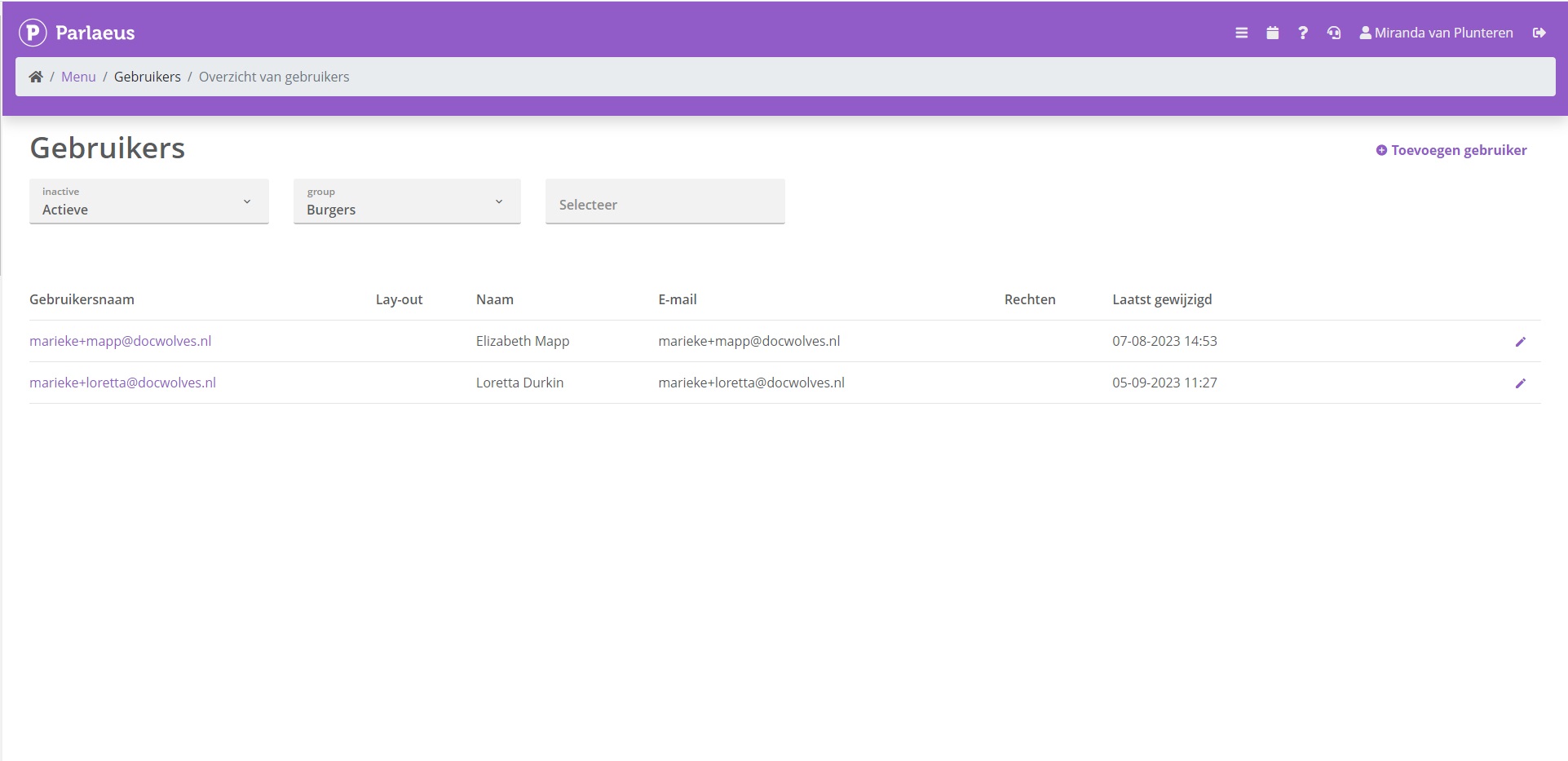
Status: Gereed | Impact: Midden | Releasenummer: 1.68 | Sprintnummer: MM 23-18 | Jira ticketnummer: VM-7139
beschikbaar op POC vanaf 28/09/2023 |
beschikbaar op Productie vanaf 12/10/2023
Bekijk "[1.68 VM-7139] Applicatiebeheer ziet bij geregistreerde burgers exclusief burgers"
[1.68 VM-7130] Module filter zoekresultaten toont inactieve modules
VM-7130
Wanneer je zoekresultaten wilde filteren op moduleniveau, dan kreeg je in de lijst met filteropties ook modules te zien die niet actief waren in het systeem. Dit ticket zorgt ervoor dat enkel actieve modules getoond worden als aanklikbare filteropties bij de zoekresultaten.
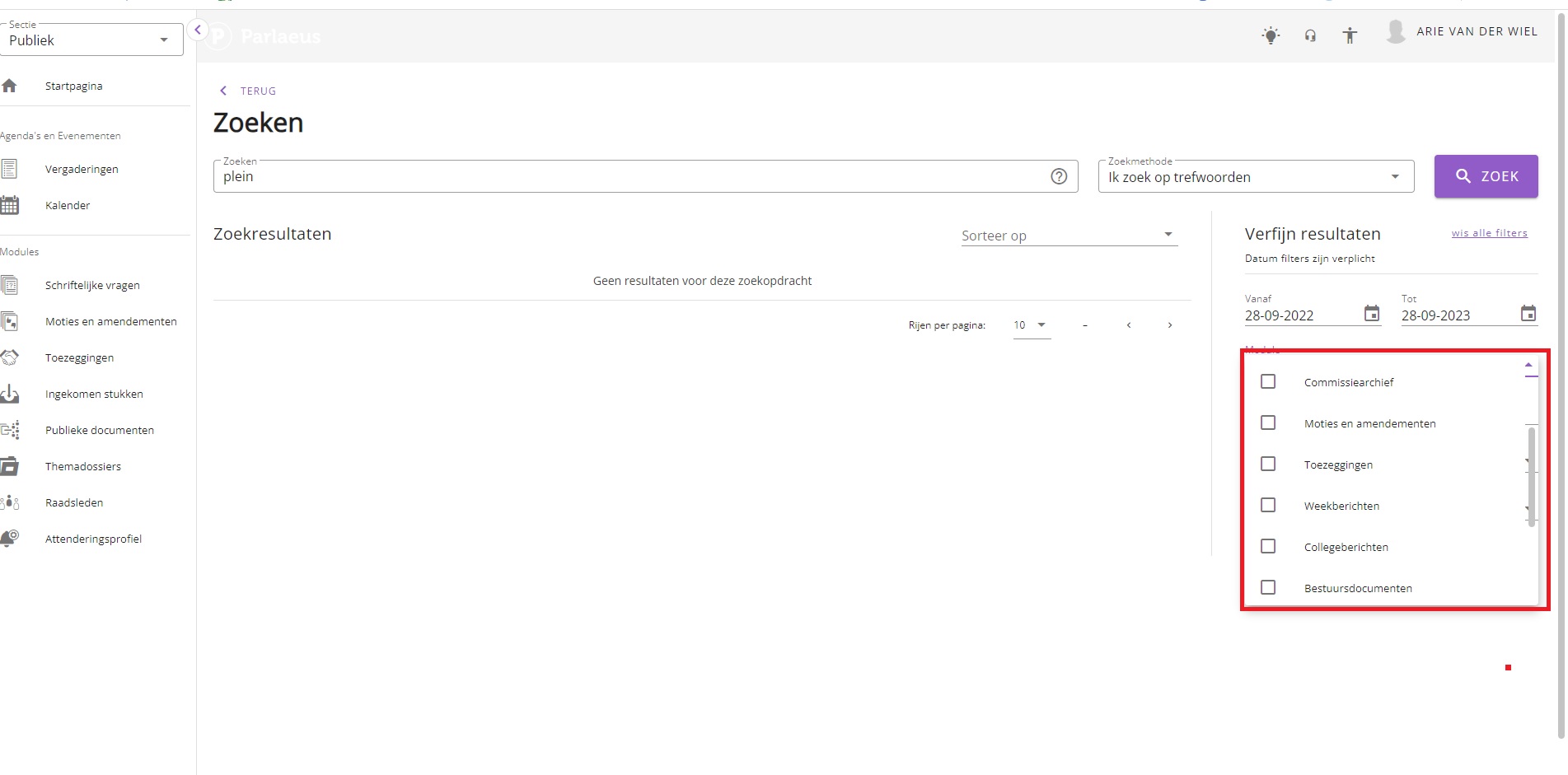
Status: Gereed | Impact: Midden | Releasenummer: 1.68 | Sprintnummer: MM 23-18 | Jira ticketnummer: VM-7130
beschikbaar op POC vanaf 28/09/2023 |
beschikbaar op Productie vanaf 12/10/2023
Bekijk "[1.68 VM-7130] Module filter zoekresultaten toont inactieve modules"
[1.68 VM-7129] Vertaalde modulenamen incorrect getoond in zoekresultatenfilter
VM-7129
Wanneer vertalingen zijn toegepast op de namen van bepaalde modules, werden bij de filteropties voor zoekresultaten op module-niveau deze vertalingen niet getoond. In plaats daarvan zag je de onvertaalde (standaard) modulenamen. Deze bug is met dit ticket opgelost.
Status: Gereed | Impact: Midden | Releasenummer: 1.68 | Sprintnummer: MM 23-18 | Jira ticketnummer: VM-7129
beschikbaar op POC vanaf 28/09/2023 |
beschikbaar op Productie vanaf 12/10/2023
Bekijk "[1.68 VM-7129] Vertaalde modulenamen incorrect getoond in zoekresultatenfilter"
[1.68 VM-6920] Volgorde nieuwsberichten door klikken en slepen te bepalen
VM-6920
De volgorde waarin nieuwsberichten op de homepagina getoond worden kan nu in de beheermodule bepaald worden door te klikken en te slepen, waarbij wat bovenin de lijst geplaatst wordt, ook als eerste op de website getoond wordt. Dit maakt het functioneel eenvoudiger voor het beheren van de content.
Status: Gereed | Impact: Midden | Releasenummer: 1.68 | Sprintnummer: MM 23-18 | Jira ticketnummer: VM-6920
beschikbaar op POC vanaf 28/09/2023 |
beschikbaar op Productie vanaf 12/10/2023
Bekijk "[1.68 VM-6920] Volgorde nieuwsberichten door klikken en slepen te bepalen"
[1.68 VM-4751] Bug in header design attenderingsmail
VM-4751
Vanwege in bug in de header van de sectie Ingekomen stukken in de attenderingsmail, werd deze niet volledig naar rechts uitgevuld en dit zag er slordig uit. Met dit ticket is deze bug opgelost.
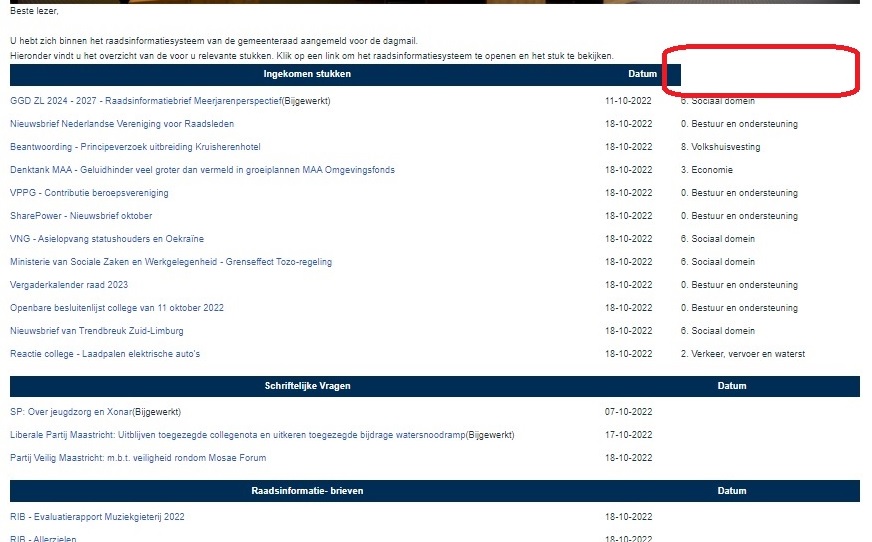
Status: Gereed | Impact: Midden | Releasenummer: 1.68 | Sprintnummer: MM 23-18 | Jira ticketnummer: VM-4751
beschikbaar op POC vanaf 28/09/2023 |
beschikbaar op Productie vanaf 12/10/2023
Bekijk "[1.68 VM-4751] Bug in header design attenderingsmail"
[1.68 VM-3864] Fractievertegenwoordigers toestaan moties te ondertekenen
VM-3864
Voortaan worden in de module moties en amendementen ook fractievertegenwoordigers getoond in de lijst van personen waar je uit kunt kiezen voor het ondertekenen van een motie of amendement.
Status: Gereed | Impact: Midden | Releasenummer: 1.68 | Sprintnummer: MM 23-18 | Jira ticketnummer: VM-3864
beschikbaar op POC vanaf 28/09/2023 |
beschikbaar op Productie vanaf 12/10/2023
Bekijk "[1.68 VM-3864] Fractievertegenwoordigers toestaan moties te ondertekenen"
[1.67 VM-7188] Nieuwe module 'Collegeberichten' toegevoegd
VM-7188
Met dit ticket is een nieuwe module voor het college gemaakt, waarmee documenten door het collegesecretariaat intern gepubliceerd kunnen worden naar collegeleden. De werking hiervan is hetzelfde als de module Ingekomen stukken.
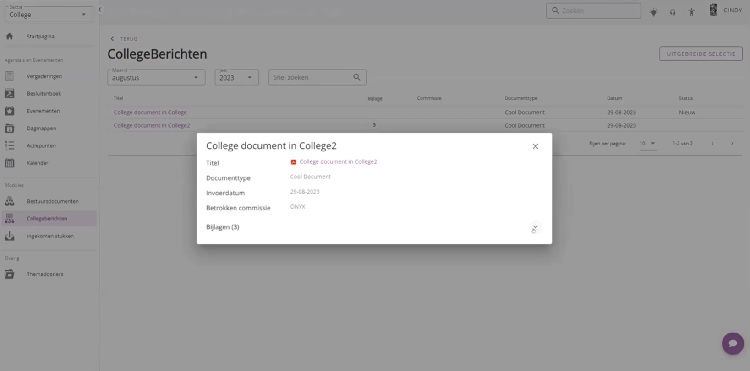
Status: Gereed | Impact: Midden | Releasenummer: 1.67 | Sprintnummer: MM 23-17 | Jira ticketnummer: VM-7188
beschikbaar op POC vanaf 14/09/2023 |
beschikbaar op Productie vanaf 28/09/2023
Bekijk "[1.67 VM-7188] Nieuwe module ‘Collegeberichten’ toegevoegd"
[1.67 VM-7146] Afbeelding in Dossiersjabloon verhinderde pdf-generatie (bug)
VM-7146
Het kon voorkomen dat wanneer je een afbeelding in een sjabloon voor een dossier plaatste, dat de pdf van het dossier niet goed gegenereerd kon worden en een lege pdf opleverde. Deze bug is met dit ticket opgelost.
Status: Gereed | Impact: Midden | Releasenummer: 1.67 | Sprintnummer: MM 23-17 | Jira ticketnummer: VM-7146
beschikbaar op POC vanaf 14/09/2023 |
beschikbaar op Productie vanaf 28/09/2023
Bekijk "[1.67 VM-7146] Afbeelding in Dossiersjabloon verhinderde pdf-generatie (bug)"
[1.67 VM-7127] Publiek miste agendadocumenten na publicatie (bug)
VM-7127
Het kon gebeuren dat na publiceren van een agenda met documenten, dat er aan de publieke kant documenten misten. Deze bug is met dit ticket op productie opgelost.
Status: Gereed | Impact: Midden | Releasenummer: 1,.67 | Sprintnummer: MM 23-17 | Jira ticketnummer: VM-7127
beschikbaar op POC vanaf 14/09/2023 |
beschikbaar op Productie vanaf 28/09/2023
Bekijk "[1.67 VM-7127] Publiek miste agendadocumenten na publicatie (bug)"
[1.67 VM-7046] Agendapunt als context van zoekopdracht nu beter zichtbaar (bug)
VM-7046
Het tonen van de context van zoekresultaten leverde slechte zichtbaarheid op van agendapunten, wanneer hier naar gerefereerd werd. Met dit ticket is ervoor gezorgd dat het betreffende agendapunt als onderdeel van de context helder zichbaar is.
Status: Gereed | Impact: Midden | Releasenummer: 1,67 | Sprintnummer: MM 23-17 | Jira ticketnummer: VM-7046
beschikbaar op POC vanaf 14/09/2023 |
beschikbaar op Productie vanaf 28/09/2023
Bekijk "[1.67 VM-7046] Agendapunt als context van zoekopdracht nu beter zichtbaar (bug)"
[1.67 VM-7045] Zoekopdracht in Nalantis kon in oneindige loop terechtkomen (bug)
VM-7045
Bij het gebruik van Nalantis in de zoekmachine, kon het voorkomen dat een zoekopdracht in een eindeloze loop terechtkwam, waardoor er geen resultaten getoond werden voor websitebezoekers. Het systeem bleef doorgaan met zoeken. Deze bug is met dit ticket opgelost.
Status: Gereed | Impact: Midden | Releasenummer: 1.67 | Sprintnummer: mm 23-17 | Jira ticketnummer: VM-7045
beschikbaar op POC vanaf 14/09/2023 |
beschikbaar op Productie vanaf 28/09/2023
Bekijk "[1.67 VM-7045] Zoekopdracht in Nalantis kon in oneindige loop terechtkomen (bug)"
[1.67 VM-6975] Changelog icoon toont beschikbare updates
VM-6975
Het changelog icoon in de header van de website toont nu een badge die aangeeft wanneer er updates zijn en het beschikbare aantal daarvan.

Status: Gereed | Impact: Midden | Releasenummer: 1.67 | Sprintnummer: mm 23-17 | Jira ticketnummer: VM-6975
beschikbaar op POC vanaf 14/09/2023 |
beschikbaar op Productie vanaf 28/09/2023
Bekijk "[1.67 VM-6975] Changelog icoon toont beschikbare updates"
[1.66 VM-6950] Correcte datumsortering raadsbesluiten op volledig jaar (bug)
VM-6950
Wanneer je de raadsbesluiten van het hele jaar ophaalde (zonder een enkele maand geselecteerd) en op datum wilde sorteren, dan klopte de datumvolgorde niet. Deze bug is met dit ticket opgelost.
Status: Gereed | Impact: Midden | Releasenummer: 1.66 | Sprintnummer: MM 23-16 | Jira ticketnummer: VM-6950
beschikbaar op POC vanaf 31/08/2023 |
beschikbaar op Productie vanaf 14/09/2023
Bekijk "[1.66 VM-6950] Correcte datumsortering raadsbesluiten op volledig jaar (bug)"
[1.66 VM-6966] Toevoegen home button op loginpagina (bug)
VM-6966
Wanneer je op de loginpagina was, ontbrak daar de home-button, zodat je je enkel terug kon naar de homepagina via de terug-knop van de browser. Deze bug is met dit ticket opgelost.
Status: Gereed | Impact: Midden | Releasenummer: 1.66 | Sprintnummer: MM 23-16 | Jira ticketnummer: VM-6966
beschikbaar op POC vanaf 31/08/2023 |
beschikbaar op Productie vanaf 14/09/2023
Bekijk "[1.66 VM-6966] Toevoegen home button op loginpagina (bug)"
[1.66 VM-6968] Deactiveren van personen geeft ze automatisch een einddatum
VM-6968
Wanneer je nu een persoon deactiveert, krijgen ze automatisch een einddatum mee. Dit is met name van belang voor de beschikbare portefeuillehouders in de module Moties en Amendementen en in de module Toezeggingen. Inactieve wethouders zijn daar zodoende niet langer meer kiesbaar.
Status: Gereed | Impact: Midden | Releasenummer: 1.66 | Sprintnummer: MM 23-16 | Jira ticketnummer: VM-6968
beschikbaar op POC vanaf 31/08/2023 |
beschikbaar op Productie vanaf 14/09/2023
Bekijk "[1.66 VM-6968] Deactiveren van personen geeft ze automatisch een einddatum"
[1.66 VM-6982] College-evenementen tonen in lijst college-secretariaat (bug)
VM-6982
Wanneer je als college-secretariaat een los evenement aanmaakte, dan werden deze nieuwe evenementen niet getoond in het lijst-overzicht van evenementen. Deze bug is met dit ticket opgelost.
Status: Gereed | Impact: Midden | Releasenummer: 1.66 | Sprintnummer: MM 23-16 | Jira ticketnummer: VM-6982
beschikbaar op POC vanaf 31/08/2023 |
beschikbaar op Productie vanaf 14/09/2023
Bekijk "[1.66 VM-6982] College-evenementen tonen in lijst college-secretariaat (bug)"
[1.66 VM-6984] Toevoegen knop 'Naar agenda' op overzicht na publicatie (bug)
VM-6984
Wanneer je een agenda publiceerde, ontbrak op de daarna volgende pagina een knop die je hielp terug te navigeren naar de agenda. Deze knop is nu op die pagina toegevoegd, zodat je de terug-knop van de browser hier niet voor hoeft te gebruiken.
Status: Gereed | Impact: Midden | Releasenummer: 1.66 | Sprintnummer: MM 23-16 | Jira ticketnummer: VM-6984
beschikbaar op POC vanaf 31/08/2023 |
beschikbaar op Productie vanaf 14/09/2023
Bekijk "[1.66 VM-6984] Toevoegen knop ‘Naar agenda’ op overzicht na publicatie (bug)"
[1.66 VM-6994] Toevoegen stemmingsuitslagen aan dialoogvenster Stemmingen
VM-6994
Op het dialoogvenster voor stemmingen dat getoond wordt wanneer je als griffie klikt op een stemming in de agenda, wordt nu de uitslag (bijv. verworpen/aangenomen) getoond wanneer deze bekend is. Dit is toegevoegd zodat de griffie sneller deze essentiële informatie voor handen heeft.
Status: Gereed | Impact: Midden | Releasenummer: 1.66 | Sprintnummer: MM 23-16 | Jira ticketnummer: VM-6994
beschikbaar op POC vanaf 31/08/2023 |
beschikbaar op Productie vanaf 14/09/2023
Bekijk "[1.66 VM-6994] Toevoegen stemmingsuitslagen aan dialoogvenster Stemmingen"
[1.66 VM-6875] Wijzigen van moties op de agenda in de eigenlijke motie
VM-6875
Wanneer je op de agenda een motie wilt bewerken die gekoppeld is aan de agenda, dan wordt je doorverwezen naar de eigenlijke motie, zodat de wijzigingen gedaan worden op het oorspronkelijke document. Daarom zul je bij bewerken op de agenda aanvankelijk velden als Titel, Vervang document en Vertrouwelijk uitgegrijsd zien.
Status: Gereed | Impact: Midden | Releasenummer: 1.66 | Sprintnummer: MM 23-16 | Jira ticketnummer: VM-6875
beschikbaar op POC vanaf 31/08/2023 |
beschikbaar op Productie vanaf 14/09/2023
Bekijk "[1.66 VM-6875] Wijzigen van moties op de agenda in de eigenlijke motie"
[1.66 VM-6947] Toevoegen van link aan klant-logo nu mogelijk
VM-6947
Met dit ticket wordt het mogelijk gemaakt om als klant een eigen link toe te voegen aan het logo linksbovenin de pagina, zodat gebruikers daarop kunnen klikken en doorgestuurd worden naar de eigen website van de klant, om aan weerszijden de diverse websites beter aan elkaar te verbinden.
Status: Gereed | Impact: Midden | Releasenummer: 1.66 | Sprintnummer: MM 23-16 | Jira ticketnummer: VM-6947
beschikbaar op POC vanaf 31/08/2023 |
beschikbaar op Productie vanaf 14/09/2023
Bekijk "[1.66 VM-6947] Toevoegen van link aan klant-logo nu mogelijk"
[1.65 VM-6916] Vertrouwelijkheid agendapunten van sjabloon overnemen in agendareeks (bug)
VM-6916
Wanneer je in een agendasjabloon agendapunten aanmerkte als vertrouwelijk, dan werd de vertrouwelijkheid niet meegenomen bij het plannen van agenda’s in een reeks (wel voor enkele agenda’s). Deze bug is met dit ticket opgelost.
Status: Gereed | Impact: Midden | Releasenummer: 1.65 | Sprintnummer: MM 23-15 | Jira ticketnummer: VM-6916
beschikbaar op POC vanaf 17/08/2023 |
beschikbaar op Productie vanaf 31/08/2023
Bekijk "[1.65 VM-6916] Vertrouwelijkheid agendapunten van sjabloon overnemen in agendareeks (bug)"
[1.65 VM-6914] Agendareeks plannen skipt eerste vergaderdatum (bug)
VM-6914
Wanneer je een reeks agenda’s plande werd de eerste datum van de reeks geskipt bij de aanmaak van agenda’s. Deze fix zorgt ervoor dat de eerst mogelijke datum vanaf waar je de planning begint ook daadwerkelijk aangemaakt wordt.
Status: Gereed | Impact: Midden | Releasenummer: 1.65 | Sprintnummer: MM 23-15 | Jira ticketnummer: VM-6914
beschikbaar op POC vanaf 17/08/2023 |
beschikbaar op Productie vanaf 31/08/2023
Bekijk "[1.65 VM-6914] Agendareeks plannen skipt eerste vergaderdatum (bug)"
[1.65 VM-5553] 'Zichtbaar voor' niet meegenomen bij plannen agendareeks (bug)
VM-5553
Wanneer je een reeks agenda’s inplande dan werd de ‘zichtbaar voor’ instelling niet getoond in het overzicht van geplande agenda’s, wat het onmogelijk maakte om vanuit het overzicht de status te bepalen van de geplande agenda’s. Deze bug is met dit ticket opgelost.
Status: Gereed | Impact: Midden | Releasenummer: 1.65 | Sprintnummer: MM 23-15 | Jira ticketnummer: VM-5553
beschikbaar op POC vanaf 17/08/2023 |
beschikbaar op Productie vanaf 31/08/2023
Bekijk "[1.65 VM-5553] ‘Zichtbaar voor’ niet meegenomen bij plannen agendareeks (bug)"
[1.65 VM-5551] Status 'vertrouwelijk' voor agenda niet overgenomen bij planning in reeks (bug)
VM-5551
Wanneer je een reeks agenda’s aanmaakte en de agenda’s hebben de commissie-instelling van ‘vertrouwelijk’ dan werd deze eigenschap niet meegenomen voor de aangemaakte agenda’s, waardoor je deze met de hand alsnog op vertrouwelijk moest zetten. Deze bug is met dit ticket opgelost.
Status: Gereed | Impact: Midden | Releasenummer: 1.65 | Sprintnummer: MM 23-15 | Jira ticketnummer: VM-5551
beschikbaar op POC vanaf 17/08/2023 |
beschikbaar op Productie vanaf 31/08/2023
Bekijk "[1.65 VM-5551] Status ‘vertrouwelijk’ voor agenda niet overgenomen bij planning in reeks (bug)"
[1.65 VM-5934] Formatting code verschijnt bij bewerken titels met opmaak in bijeenkomst (bug)
VM-5934
Wanneer je als griffie een agendapunt in een bijeenkomst wilde bewerken die een opmaak bevatte, zoals cursief, vet of onderstreept, dan werd de formatting code zichtbaar. Dit gebeurde eveneens in de tooltip wanneer je eroverheen muisde. Deze bug is nu opgelost.
Status: Testing | Impact: Midden | Releasenummer: 1.65 | Sprintnummer: mm 23-15 | Jira ticketnummer: VM-5934
beschikbaar op POC vanaf 17/08/2023 |
beschikbaar op Productie vanaf 31/08/2023
Bekijk "[1.65 VM-5934] Formatting code verschijnt bij bewerken titels met opmaak in bijeenkomst (bug)"
[1.65 VM-6179] Implementatie van Zoeken voor college | enkel in college-documenten
VM-6179
Dit ticket maakt het mogelijk voor collegeleden om te zoeken in een selectie van enkel college-documenten. Deze zoek-module beperkt de zoekresultaten tot enkel documenten die onderdeel zijn van de College-sectie. De werking van de module wat betreft indexering en filter-gereedschap is hetzelfde als die van raadsdocumenten. Inbegrepen in de zoekresultaten zijn agenda’s, dagmappen, verslaglegging, bestuursdocumenten, collegeberichten, ingekomen stukken, themadossiers en themadossiers van het College.
Status: Gereed | Impact: Midden | Releasenummer: 1.65 | Sprintnummer: MM 23-15 | Jira ticketnummer: VM-6179
beschikbaar op POC vanaf 17/08/2023 |
beschikbaar op Productie vanaf 31/08/2023
Bekijk "[1.65 VM-6179] Implementatie van Zoeken voor college | enkel in college-documenten"
[1.65 VM-457] Auteur ALICE-items zichtbaar in Parlaeus
VM-457
In de metadata wordt nu meegenomen wie een bepaald import-item in ALICE heeft aangemaakt, zodat in Parlaeus deze informatie getoond wordt en helder is waar er een fout gemaakt is, wanneer dit het geval is.
Status: Gereed | Impact: Midden | Releasenummer: 1.65 | Sprintnummer: MM 23-15 | Jira ticketnummer: VM-457
beschikbaar op POC vanaf 17/08/2023 |
beschikbaar op Productie vanaf 31/08/2023
Bekijk "[1.65 VM-457] Auteur ALICE-items zichtbaar in Parlaeus"
[1.64 VOT-931] Tweede NFC-ID kaart voor sprekers mogelijk
VOT-931
Alle sprekersmarkeringen van dezelfde persoon in verschillende rollen, worden bij dezelfde persoon geregistreerd.
Voor gebruikers die ook een rol als voorzitter hebben (raadsleden, burgemeester in hoedanigheid als voorzitter van de raad) hebben we een tweede NFC-ID veld gemaakt.
Status: Gereed | Impact: Midden | Releasenummer: 1.64 | Sprintnummer: VOT 23-14 | Jira ticketnummer: VOT-931
beschikbaar op POC vanaf 03/08/2023 |
beschikbaar op Productie vanaf 17/08/2023
Bekijk "[1.64 VOT-931] Tweede NFC-ID kaart voor sprekers mogelijk"
[1.64 VOT-895] Correct labelen van uitzending bijeenkomst (bug)
VOT-895
Bij een uitzending van een bijeenkomst stond het woord ‘video’ op de homepage en bij de bijeenkomst zelf, terwijl dit ‘uitzending’ zijn. Deze bug is met dit ticket opgelost.
Status: Gereed | Impact: Midden | Releasenummer: 1.64 | Sprintnummer: VOT 23-14 | Jira ticketnummer: VOT-895
beschikbaar op POC vanaf 03/08/2023 |
beschikbaar op Productie vanaf 17/08/2023
Bekijk "[1.64 VOT-895] Correct labelen van uitzending bijeenkomst (bug)"
[1.64 VM-6862] Logo bovenbalk blijft zichtbaar bij uitgeklapt menu
VM-6862
Het was zo dat het logo in de bovenbalk verdween wanneer je het menu uitklapt in de VUE versie van de website. Het is nu zo gemaakt dat het logo zichtbaar blijft wanneer je het menu openvouwt en mee naar rechts opschuift.
Status: Gereed | Impact: Midden | Releasenummer: 1.64 | Sprintnummer: MM 23-14 | Jira ticketnummer: VM-6862
beschikbaar op POC vanaf 03/08/2023 |
beschikbaar op Productie vanaf 17/08/2023
Bekijk "[1.64 VM-6862] Logo bovenbalk blijft zichtbaar bij uitgeklapt menu"
[1.64 VM-6839] Verslag beschikbaar voor Raad en College in Bootstrap4-versie
VM-6839
Dit ticket zorgt ervoor dat zowel raadsleden als collegeleden in de Bootstrap4-versie van de website het verslag kunnen lezen wanneer het eenmaal gepubliceerd is.
Status: Gereed | Impact: Hoog | Releasenummer: 1.64 | Sprintnummer: MM 23-14 | Jira ticketnummer: VM-6839
beschikbaar op POC vanaf 03/08/2023 |
beschikbaar op Productie vanaf 17/08/2023
Bekijk "[1.64 VM-6839] Verslag beschikbaar voor Raad en College in Bootstrap4-versie"
[1.64 VM-6835] Verslag beschikbaar in app voor Raads- en Collegeleden
VM-6835
Dit ticket zorgt ervoor dat gepubliceerde versies van het verslag ook te lezen zijn in de app voor raads- en collegeleden.
Status: Gereed | Impact: Hoog | Releasenummer: 1.64 | Sprintnummer: MM 23-14 | Jira ticketnummer: VM-6835
beschikbaar op POC vanaf 03/08/2023 |
beschikbaar op Productie vanaf 17/08/2023
Bekijk "[1.64 VM-6835] Verslag beschikbaar in app voor Raads- en Collegeleden"
[1.64 VM-6837] Verslag beschikbaar voor Raads- en Collegeleden in VUE-versie van de website
VM-6837
Dit ticket zorgt er voor dat gepubliceerde verslagen zichtbaar zijn in de VUE-versie van website voor zowel Raadsleden als Collegeleden.
Status: Gereed | Impact: Hoog | Releasenummer: 1.64 | Sprintnummer: MM 23-14 | Jira ticketnummer: VM-6837
beschikbaar op POC vanaf 03/08/2023 |
beschikbaar op Productie vanaf 17/08/2023
Bekijk "[1.64 VM-6837] Verslag beschikbaar voor Raads- en Collegeleden in VUE-versie van de website"
[1.64 VM-6823] Optimalisatie invoerveld bij Technische vraag (bug)
VM-6823
Wanneer je het veld ‘Vraag’ leeg liet bij het aanmaken van een technische vraag, kon je na opslaan dit niet meer corrigeren, waardoor je verplicht het dialoogvenster moest sluiten en een nieuwe Technische vraag moest aanmaken. Deze bug is met dit ticket opgelost.
Status: Gereed | Impact: Laag | Releasenummer: 1.64 | Sprintnummer: MM 23-14 | Jira ticketnummer: VM-6823
beschikbaar op POC vanaf 03/08/2023 |
beschikbaar op Productie vanaf 17/08/2023
Bekijk "[1.64 VM-6823] Optimalisatie invoerveld bij Technische vraag (bug)"
[1.64 VM-6819] Agendapunt bewerken op bijeenkomstniveau
VM-6819
Wanneer je vanuit het overzicht van een bijeenkomst een agendapunt wilde bewerken, voerde de edit-knop je terug naar de onderliggende agenda om van daaruit het te bewerken agendapunt op te pakken. Met dit ticket is deze bug opgelost en bewerk je vanuit de bijeenkomst direct het betreffende agendapunt.
Status: Gereed | Impact: Midden | Releasenummer: 1.64 | Sprintnummer: MM 23-14 | Jira ticketnummer: VM-6819
beschikbaar op POC vanaf 03/08/2023 |
beschikbaar op Productie vanaf 17/08/2023
Bekijk "[1.64 VM-6819] Agendapunt bewerken op bijeenkomstniveau"
[1.64 VM-6806] Toegang geanonimiseerde audit-informatie voor klant
VM-6806
In de audit trail worden mislukte loginpogingen en gebruiker-blokkades bijgehouden. Een geanonimiseerde versie hiervan wordt beschikbaar gemaakt voor de klant. In geval van incidenten waarin verder onderzoek vereist is, heeft DocWolves toegang tot de niet-geanonimiseerde versie. Deze werkwijze vervangt de voorgaande versie van gescript zoeken in serverlogs.
Status: Gereed | Impact: Midden | Releasenummer: 1.64 | Sprintnummer: MM 23-14 | Jira ticketnummer: VM-6806
beschikbaar op POC vanaf 03/08/2023 |
beschikbaar op Productie vanaf 17/08/2023
Bekijk "[1.64 VM-6806] Toegang geanonimiseerde audit-informatie voor klant"
[1.64 VM-6567] Nieuwe module 'Bestuursdocumenten' voor college
VM-6567
Met dit ticket is een nieuwe module ‘Bestuursdocumenten’ gemaakt, speciaal voor college. Deze module bestaat separaat van de module voor de Raad.
Status: Gereed | Impact: Midden | Releasenummer: 1.64 | Sprintnummer: MM 23-14 | Jira ticketnummer: VM-6567
beschikbaar op POC vanaf 03/08/2023 |
beschikbaar op Productie vanaf 17/08/2023
Bekijk "[1.64 VM-6567] Nieuwe module ‘Bestuursdocumenten’ voor college"
[1.64 VM-6727] Fix voor Unsubscribe van dagmail (bug)
VM-6727
Wanneer je je wilde afmelden voor de dagmail voor publiek (maillist), kreeg je een foutmelding, waardoor de afmelding niet verwerkt werd. Dit was vanwege een schrijfvout in de link in de mail. Deze bug is met dit ticket opgelost.
Status: Gereed | Impact: Midden | Releasenummer: 1.64 | Sprintnummer: MM 23-14 | Jira ticketnummer: VM-6727
beschikbaar op POC vanaf 03/08/2023 |
beschikbaar op Productie vanaf 17/08/2023
Bekijk "[1.64 VM-6727] Fix voor Unsubscribe van dagmail (bug)"
[1.64 VM-5702] Opslaan van gewijzigde taal-instelling werkt niet (bug)
VM-5702
Wanneer je in de VUE-versie van de website je persoonlijke gegevens ging bewerken en koos voor een andere taal dan de huidige, werd bij het opslaan de wijziging niet verwerkt. Deze bug is met dit ticket opgelost.
Status: Gereed | Impact: Midden | Releasenummer: 1.64 | Sprintnummer: MM 23-14 | Jira ticketnummer: VM-5702
beschikbaar op POC vanaf 03/08/2023 |
beschikbaar op Productie vanaf 17/08/2023
Bekijk "[1.64 VM-5702] Opslaan van gewijzigde taal-instelling werkt niet (bug)"
[1.64 VM-5616] Opslaan 'extra zaal' in bijeenkomst zonder tijd werkt niet
VM-5616
Wanneer je bij een bestaande bijeenkomst een extra zaal wilde toevoegen en daarbij geen tijd invoerde in het tijdsveld, dan werd de zaal niet opgeslagen. Wanneer je dat nu probeert, dan krijg je een melding in rood ‘Zaal is niet gekozen’, zonder dat er opgeslagen wordt, zodat je alsnog het tijdsveld kunt invoeren en opnieuw kunt opslaan.
Status: Gereed | Impact: Midden | Releasenummer: 1.64 | Sprintnummer: MM 23-14 | Jira ticketnummer: VM-5616
beschikbaar op POC vanaf 03/08/2023 |
beschikbaar op Productie vanaf 17/08/2023
Bekijk "[1.64 VM-5616] Opslaan ‘extra zaal’ in bijeenkomst zonder tijd werkt niet"
[1.64 VM-4538] Themadossier knoppen 'Publiceren' en 'nieuw dossier' geharmoniseerd met rest van systeem
VM-4538
In de themadossiers stonden de knoppen ‘Publiceren’ en ‘nieuw dossier’ qua logica in omgekeerde volgorde dan is toegepast in de overige modules van het systeem, wat verwarrend was. Met dit ticket is dat in lijn gebracht met de overige pagina’s in Bootstrap4.
Status: Gereed | Impact: Midden | Releasenummer: 1.64 | Sprintnummer: MM 23-14 | Jira ticketnummer: VM-4538
beschikbaar op POC vanaf 03/08/2023 |
beschikbaar op Productie vanaf 17/08/2023
Bekijk "[1.64 VM-4538] Themadossier knoppen ‘Publiceren’ en ‘nieuw dossier’ geharmoniseerd met rest van systeem"
[1.64 VM-4534] Knop 'Opslaan en bijlage' bij verordeningen werkt niet (bug)
VM-4534
Wanneer je bij verordeningen klikte op de knop ‘Opslaan en bijlage’ werd de pagina ververst. In plaats van dat je een bijlage kon toevoegen, moest je opnieuw het document uploaden. Deze bug is met dit ticket opgelost.
Status: Gereed | Impact: Midden | Releasenummer: 1.64 | Sprintnummer: MM 23-14 | Jira ticketnummer: VM-4534
beschikbaar op POC vanaf 03/08/2023 |
beschikbaar op Productie vanaf 17/08/2023
Bekijk "[1.64 VM-4534] Knop ‘Opslaan en bijlage’ bij verordeningen werkt niet (bug)"
[1.64 VOT-974] Geen partij-info voor voorzitter in API koppeling MVI en Cmeets
VOT-974
Om te verhinderen dat de partijnaam in de videotitel verschijnt wanneer een partijlid als voorzitter optreedt, is er een wijziging toegepast op de API-koppeling met MVI en Cmeets die een eigen route introduceert voor de voorzitter, wanneer deze tevens een partijlid is.
Change koppeling MVI en Cmeets
Status: Gereed | Impact: Midden | Releasenummer: 1.64 | Sprintnummer: VOT 23-14 | Jira ticketnummer: VOT-974
beschikbaar op POC vanaf 03/08/2023 |
beschikbaar op Productie vanaf 17/08/2023
Bekijk "[1.64 VOT-974] Geen partij-info voor voorzitter in API koppeling MVI en Cmeets"
[1.63 VM-4439] Tab 'Historie' voor moties en amendementen
VM-4439
Hiermee wordt een tabblad ‘Historie’ toegevoegd aan moties en amendementen zodat een raadslid na een stemming in een raadsvergadering de stemmingsuitslag van de motie kan bekijken.
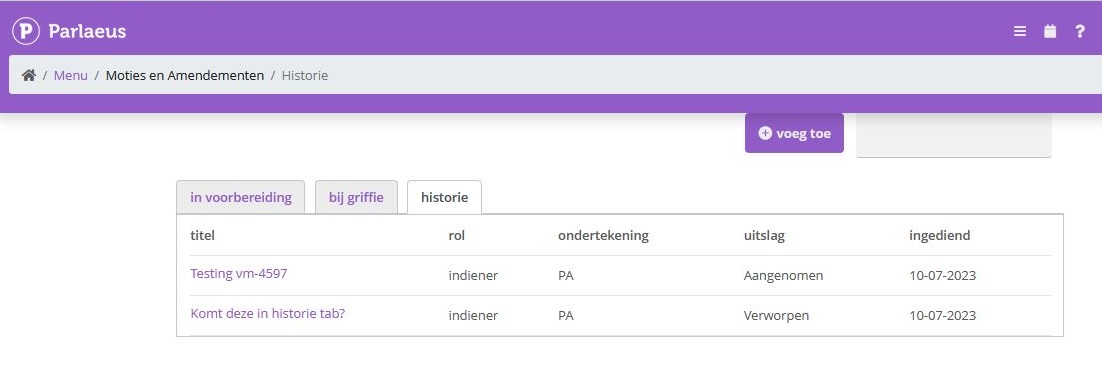
Status: Gereed | Impact: Midden | Releasenummer: 1.63 | Sprintnummer: MM 23-13 | Jira ticketnummer: VM-4439
beschikbaar op POC vanaf 20/07/2023 |
beschikbaar op Productie vanaf 03/08/2023
Bekijk "[1.63 VM-4439] Tab ‘Historie’ voor moties en amendementen"
[1.63 VM-4597] Tab 'Bij de griffie' voor moties en amendementen
VM-4597
Hiermee wordt een tabblad ‘bij griffie’ toegevoegd aan moties en amendementen zodat een raadslid dat namens de partij een motie heeft ingediend een duidelijker overzicht heeft van moties die nog in bewerking zijn en daadwerkelijk zijn ingediend.
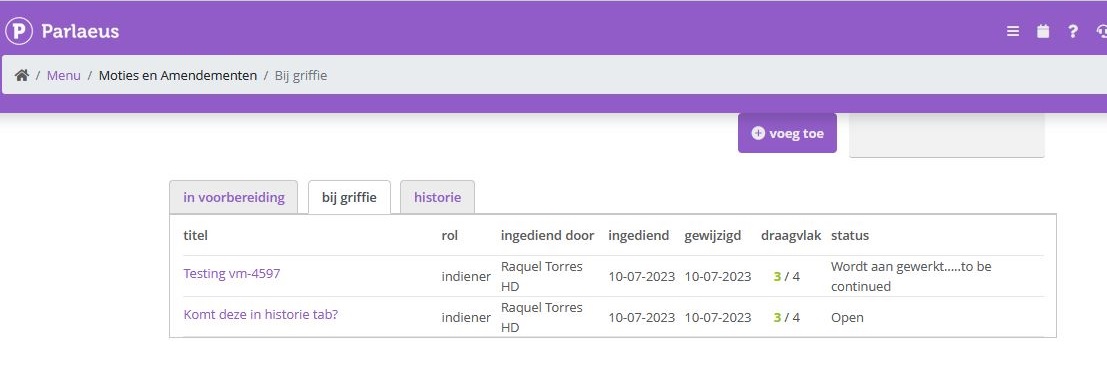
Status: Gereed | Impact: Midden | Releasenummer: 1.63 | Sprintnummer: MM 23-13 | Jira ticketnummer: VM-4597
beschikbaar op POC vanaf 20/07/2023 |
beschikbaar op Productie vanaf 03/08/2023
Bekijk "[1.63 VM-4597] Tab ‘Bij de griffie’ voor moties en amendementen"
[1.63 VM-5046] Voorkeursinstellingen voor kalenderweergave nu op te slaan
VM-5046
Je kunt als gebruiker via de instellingen van je persoonlijk profiel kiezen wat je voorkeursweergave is voor de kalender, per maand, week, dag of lijstweergave en deze opslaan, zodat je hier bij een volgende sessie niets voor hoeft aan te klikken.
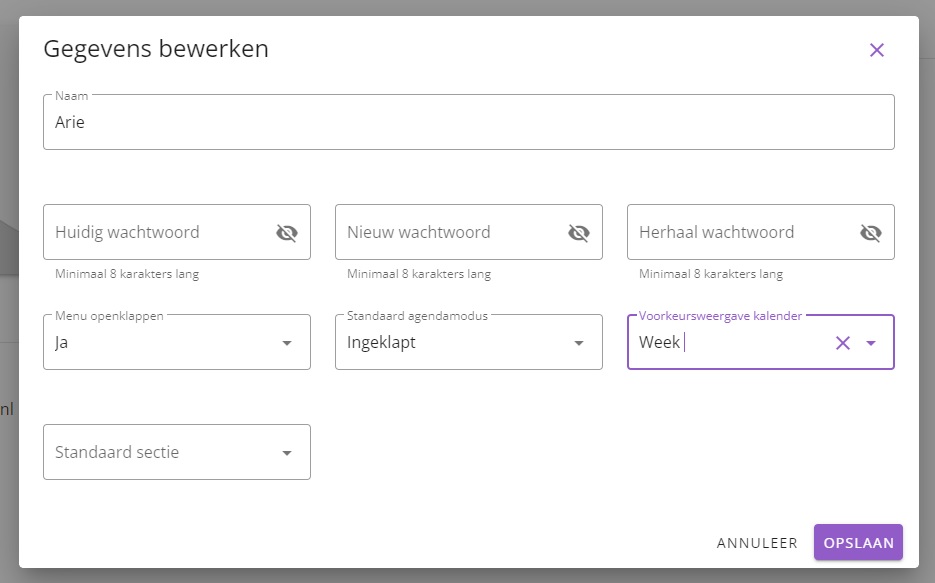
Status: Gereed | Impact: Midden | Releasenummer: 1.63 | Sprintnummer: MM 23-13 | Jira ticketnummer: VM-5046
beschikbaar op POC vanaf 20/07/2023 |
beschikbaar op Productie vanaf 03/08/2023
Bekijk "[1.63 VM-5046] Voorkeursinstellingen voor kalenderweergave nu op te slaan"
[1.63 VOT-908] Optie video delen naar 1 delen knop
VOT-908
Waar er eerst meerdere knoppen waren om een video te delen op meerdere platforms, wordt dit nu teruggebracht naar 1 knop voor het delen rechtsbovenin, waarna je de keuze krijgt tussen verschillende media platforms om het item op te delen, zoals twitter, facebook en linkedin.

Status: Testing | Impact: Midden | Releasenummer: 1.63 | Sprintnummer: MM 23-13 | Jira ticketnummer: VOT-908
beschikbaar op POC vanaf 20/07/2023 |
beschikbaar op Productie vanaf 03/08/2023
Bekijk "[1.63 VOT-908] Optie video delen naar 1 delen knop"
[1.63 VOT-937] Encoder kiezen nu geregistreerd als wijziging (bug)
VOT-937
Het kiezen van een (andere) encoder wordt nu geregistreerd als wijziging van de agenda, zodat je na de wissel ook de agenda opnieuw kunt publiceren, zodat de agenda correct wordt getoond als ‘uitzending gepland’.
Status: Testing | Impact: Midden | Releasenummer: 1.63 | Sprintnummer: MM 23-13 | Jira ticketnummer: VOT-937
beschikbaar op POC vanaf 20/07/2023 |
beschikbaar op Productie vanaf 03/08/2023
Bekijk "[1.63 VOT-937] Encoder kiezen nu geregistreerd als wijziging (bug)"
[1.63 VM-6847] Logging voor email notificaties technische vragen aan Stellers
VM-6847
Om vast te kunnen stellen of de verzending van email notificatie na het stellen van een technische vraag vanuit de college-agenda altijd correct volgens de instellingen verloopt, is hiervoor extra logging toegevoegd, zodat bij onzekerheid hierover meer accuraat nagegaan kan worden wat er precies heeft plaatsgevonden.
Status: Gereed | Impact: Midden | Releasenummer: 1.63 | Sprintnummer: MM 23-13 | Jira ticketnummer: VM-6847
beschikbaar op POC vanaf 20/07/2023 |
beschikbaar op Productie vanaf 03/08/2023
Bekijk "[1.63 VM-6847] Logging voor email notificaties technische vragen aan Stellers"
[1.63 VM-6635] PDF-download luistert naar accentuatie van wijzigingen in motie editor
VM-6635
Wijzigingen in de tekst van een motie of amendement die nog niet geaccepteerd zijn, worden in de PDF geaccentueerd. Toegevoegde tekst die nog niet geaccepteerd is, wordt onderstreept. Tekst die verwijderd is, waarvan de verwijdering nog niet geaccepteerd is, wordt getoond als doorgestreept.
Status: Testing | Impact: Midden | Releasenummer: 1.63 | Sprintnummer: MM 23-13 | Jira ticketnummer: VM-6635
beschikbaar op POC vanaf 20/07/2023 |
beschikbaar op Productie vanaf 03/08/2023
Bekijk "[1.63 VM-6635] PDF-download luistert naar accentuatie van wijzigingen in motie editor"
[1.63 VM-6634] Web editor moties en amendementen luistert naar accentuatie van wijzigingen
VM-6634
Wijzigingen in de tekst van een motie of amendement die nog niet geaccepteerd zijn, worden in de motie editor geaccentueerd. Toegevoegde tekst die nog niet geaccepteerd is, wordt onderstreept. Tekst die verwijderd is, waarvan de verwijdering nog niet geaccepteerd is, wordt getoond als doorgestreept.
Status: Testing | Impact: Midden | Releasenummer: 1.63 | Sprintnummer: MM 23-13 | Jira ticketnummer: VM-6634
beschikbaar op POC vanaf 20/07/2023 |
beschikbaar op Productie vanaf 03/08/2023
Bekijk "[1.63 VM-6634] Web editor moties en amendementen luistert naar accentuatie van wijzigingen"
[1.63 VM-6544] Beschikbaarheid toont naam specialist en specialisme
VM-6544
In de beschikbaarheidsmodule wordt de header ‘Beschikbaarheid teams’ vervangen door ‘Beschikbaarheid +[naam specialist] +[naam specialisme]’, zodat de ervaring meer gepersonaliseerd is en meer helder is wat je precies doet.
Status: Gereed | Impact: Midden | Releasenummer: 1.63 | Sprintnummer: MM 23-13 | Jira ticketnummer: VM-6544
beschikbaar op POC vanaf 20/07/2023 |
beschikbaar op Productie vanaf 03/08/2023
Bekijk "[1.63 VM-6544] Beschikbaarheid toont naam specialist en specialisme"
[1.63 VM-6631] Bijhouden wijzigingen in motie editor configurabel
VM-6631
Het wel of niet bijhouden van wijzigingen in de motie editor is nu configurabel, zodat je kunt kiezen of je wel of niet gebruik wilt maken van deze optie in de module.
Status: Testing | Impact: Midden | Releasenummer: 1.63 | Sprintnummer: MM 23-13 | Jira ticketnummer: VM-6631
beschikbaar op POC vanaf 20/07/2023 |
beschikbaar op Productie vanaf 03/08/2023
Bekijk "[1.63 VM-6631] Bijhouden wijzigingen in motie editor configurabel"
[1.63 VM-6632] Activatie wijzigingen bijhouden motie editor incl. paars, rood en oranje
VM-6632
Hiermee is de plugin voor het bijhouden van wijzigingen in de tekst editor van de motiemodule geactiveerd, inclusief het gebruik van de kleuren paars, rood en oranje, naast groen, geel en blauw.
Status: Testing | Impact: Midden | Releasenummer: 1.63 | Sprintnummer: MM 23-13 | Jira ticketnummer: VM-6632
beschikbaar op POC vanaf 20/07/2023 |
beschikbaar op Productie vanaf 03/08/2023
Bekijk "[1.63 VM-6632] Activatie wijzigingen bijhouden motie editor incl. paars, rood en oranje"
[1.63 VM-6633] Accepteren/weigeren opties voor ontvanger wijzigingen motie-editor
VM-6633
Voorgestelde wijzigingen aan een motie kunnen nu geaccepteerd en geweigerd worden, zodat de dossier-eigenaar ze wel of niet kan toevoegen aan de tekst.
Status: Testing | Impact: Midden | Releasenummer: 1.63 | Sprintnummer: MM 23-13 | Jira ticketnummer: VM-6633
beschikbaar op POC vanaf 20/07/2023 |
beschikbaar op Productie vanaf 03/08/2023
Bekijk "[1.63 VM-6633] Accepteren/weigeren opties voor ontvanger wijzigingen motie-editor"
[1.63 VM-6324] Breadcrumb-menu specialisten mist een stap (bug)
VM-6324
De middelste stap van het Breadcrumb-menu voor specialisten werkte niet wanneer je in het overzicht van specialisten zat. Met dit ticket is ervoor gezorgd dat klikken op de verschillende breadcrumb-onderdelen navigeert naar de juiste en bedoelde pagina’s.
Status: Gereed | Impact: Midden | Releasenummer: 1.63 | Sprintnummer: MM 23-13 | Jira ticketnummer: VM-6324
beschikbaar op POC vanaf 20/07/2023 |
beschikbaar op Productie vanaf 03/08/2023
Bekijk "[1.63 VM-6324] Breadcrumb-menu specialisten mist een stap (bug)"
[1.63 VM-6210] Inloggen met college-secretariaatsrechten porteert direct naar college-secretariaat
VM-6210
Wanneer je inlogt met een account dat college-secretariaatsrechten heeft, kom je automatisch de website binnen op de pagina van het college-secretariaat.
Status: Testing | Impact: Midden | Releasenummer: 1.63 | Sprintnummer: MM 23-13 | Jira ticketnummer: VM-6210
beschikbaar op POC vanaf 20/07/2023 |
beschikbaar op Productie vanaf 03/08/2023
Bekijk "[1.63 VM-6210] Inloggen met college-secretariaatsrechten porteert direct naar college-secretariaat"
[1.63 VM-5675] pdf2pdf code kapot in agenda editor (bug)
VM-5675
Een stuk pdf-reparatiecode, pdf2pdf, werkte niet goed meer door wijzigingen aan de editor, waardoor pdf-generatie en distributies problemen ondervonden. Dat issue is met dit ticket opgelost.
Status: Gereed | Impact: Midden | Releasenummer: 1.63 | Sprintnummer: MM 23-13 | Jira ticketnummer: VM-5675
beschikbaar op POC vanaf 20/07/2023 |
beschikbaar op Productie vanaf 03/08/2023
Bekijk "[1.63 VM-5675] pdf2pdf code kapot in agenda editor (bug)"
[1.63 VM-5507] Uitbreiding synchronisatie van modules met Nalantis zoeken
VM-5507
Voor klanten die gebruik maken van de Nalantis zoeken-module is de synchronisatie uitgebreid met data van nog meer modules: Agenda’s, Bijeenkomsten, Verslagen, Schriftelijke vragen, Raadsinformatiebrieven, Ingekomen stukken, Moties en amendementen, Toezeggingen en Dossiers, waardoor het zoekbereik en de uitkomst van zoekopdrachten verder is uitgebreid.
Status: Gereed | Impact: Midden | Releasenummer: 1.63 | Sprintnummer: MM 23-13 | Jira ticketnummer: VM-5507
beschikbaar op POC vanaf 20/07/2023 |
beschikbaar op Productie vanaf 03/08/2023
Bekijk "[1.63 VM-5507] Uitbreiding synchronisatie van modules met Nalantis zoeken"
[1.63 VM-4866] Download Word bestanden op iPad in Safari sloot sessie (bug)
VM-4866
Het kon gebeuren dat wanneer je vanuit themadossiers een Word bestand wilde downloaden naar een iPad vanuit de browser Safari, dat je sessie onmiddellijk afgesloten werd. Dit is nu opgelost.
Status: Gereed | Impact: Midden | Releasenummer: 1.63 | Sprintnummer: MM 23-13 | Jira ticketnummer: VM-4866
beschikbaar op POC vanaf 20/07/2023 |
beschikbaar op Productie vanaf 03/08/2023
Bekijk "[1.63 VM-4866] Download Word bestanden op iPad in Safari sloot sessie (bug)"
[1.62 VM-5814] Datumselectie in management archief module
VM-5814
Bij het archiveren in de Archiefmodule ontbrak er een datumselectie tool waardoor je deze handmatig moest invoeren. Voor begin- en einddatums kun je deze nu aan de hand van een dropdown-kalender kiezen.
Status: Gereed | Impact: Midden | Releasenummer: 1.62 | Sprintnummer: MM 23-12 | Jira ticketnummer: VM-5814
beschikbaar op POC vanaf 06/07/2023 |
beschikbaar op Productie vanaf 20/07/2023
Bekijk "[1.62 VM-5814] Datumselectie in management archief module"
[1.62 VM-6561] Datum en tijdstip archiveren tonen op gearchiveerde stukken
VM-6561
Het dialoogvenster op gearchiveerde documenten in de griffiemodulen van Agenda’s en Ingekomen stukken tonen voortaan de datum en het tijdstip waarop de archiveeractie bevestigd is, zodat voor griffie en beheerders helder is wanneer een bepaald document gearchiveerd werd.
Status: Gereed | Impact: Midden | Releasenummer: 1.62 | Sprintnummer: MM 23-12 | Jira ticketnummer: VM-6561
beschikbaar op POC vanaf 06/07/2023 |
beschikbaar op Productie vanaf 20/07/2023
Bekijk "[1.62 VM-6561] Datum en tijdstip archiveren tonen op gearchiveerde stukken"
[1.62 VM-6178] Twee-factor authenticatie voor VUE-versie van de website
VM-6178
Als onderdeel van uitbreidingen van de beveiligingsmogelijkheden kan twee-factor authenticatie via email of sms toegepast worden op de nieuwe VUE-versie van de website.
Status: Gereed | Impact: Hoog | Releasenummer: 1.62 | Sprintnummer: MM 23-12 | Jira ticketnummer: VM-6178
beschikbaar op POC vanaf 06/07/2023 |
beschikbaar op Productie vanaf 20/07/2023
Bekijk "[1.62 VM-6178] Twee-factor authenticatie voor VUE-versie van de website"
[1.62 VM-6603] Status vertrouwelijk altijd leidend icm externe koppeling
VM-6603
Wanneer er gebruik gemaakt wordt van een externe koppeling voor aanlevering van documenten en er een stuk wordt aangeleverd met de status van vertrouwelijk of documenttype vertrouwelijk, dan neemt Parlaeus deze status over. Tegelijkertijd, wanneer een document in Parlaeus de status van vertrouwelijk heeft, dan behoudt het document deze status, ook wanneer via de koppeling er een stuk of een nieuwe versie van een stuk doorkomt dat de status van vertrouwelijk mist. Enige aanwezigheid van de status van vertrouwelijk op welk niveau dan ook is dus altijd leidend en bepaalt dat het stuk vertrouwelijk is. Tevens, wanneer er tegenstrijdigheden bestaan tussen Parlaeus en de bron voor de koppeling.
Status: Gereed | Impact: Midden | Releasenummer: 1.62 | Sprintnummer: MM 23-12 | Jira ticketnummer: VM-6603
beschikbaar op POC vanaf 06/07/2023 |
beschikbaar op Productie vanaf 20/07/2023
Bekijk "[1.62 VM-6603] Status vertrouwelijk altijd leidend icm externe koppeling"
[1.62 VM-5190] Gewijzigde status vertrouwelijkheid motie niet getoond in agenda (bug)
VM-5190
Het kon gebeuren dat wanneer je de status van een bestaande Motie of Amendement wijzigde, dat de status hiervan niet werd meegewijzigd in de agenda waaraan de motie gekoppeld was. Deze bug is met dit ticket opgelost.
Status: Gereed | Impact: Hoog | Releasenummer: 1.62 | Sprintnummer: MM 23-12 | Jira ticketnummer: VM-5190
beschikbaar op POC vanaf 06/07/2023 |
beschikbaar op Productie vanaf 20/07/2023
Bekijk "[1.62 VM-5190] Gewijzigde status vertrouwelijkheid motie niet getoond in agenda (bug)"
[1.61 VM-6602] HTML foutmelding in rode letters hindert gebruik (bug)
VM-6602
Het kon voorkomen op de VUE versie van de website dat er een groot rood blok met een foutmelding in HTML-code verscheen waardoor je als raadslid het systeem niet kon gebruiken. Dat probleem is in dit ticket met spoed op productie opgelost.
Status: Gereed | Impact: Midden | Releasenummer: 1.61 | Sprintnummer: MM 23-11 | Jira ticketnummer: VM-6602
beschikbaar op POC vanaf 22/06/2023 |
beschikbaar op Productie vanaf 06/07/2023
Bekijk "[1.61 VM-6602] HTML foutmelding in rode letters hindert gebruik (bug)"
[1.61 VM-6161] Moties en amendementen te bewerken voor gehele partij
VM-6161
Met dit ticket wordt configurabel gemaakt of dat een motie of amendement enkel gezien en bewerkt wordt door de aanmaker zoals nu standaard het geval is, of dat alle leden van een partij deze moties en amendementen kunnen zien en bewerken, wat de nieuw-geïntroduceerde mogelijkheid is.
Status: Gereed | Impact: Midden | Releasenummer: 1.61 | Sprintnummer: MM 23-11 | Jira ticketnummer: VM-6161
beschikbaar op POC vanaf 22/06/2023 |
beschikbaar op Productie vanaf 06/07/2023
Bekijk "[1.61 VM-6161] Moties en amendementen te bewerken voor gehele partij"
[1.61 VM-6334] Lange laadtijd agenda's (bug)
VM-6334
Voor sommige agendabeheerders bij Griffie en College loopt de laadtijd te hoog op. Met dit ticket is onderzocht welke factoren hierop van invloed zijn. Om een optimalisatie te realiseren wordt bij het ophalen van de lijst van agenda’s de informatie omtrent de distributiestatus van de agenda’s niet langer meer meegenomen.
Status: Gereed | Impact: Midden | Releasenummer: 1.61 | Sprintnummer: MM 23-11 | Jira ticketnummer: VM-6334
beschikbaar op POC vanaf 22/06/2023 |
beschikbaar op Productie vanaf 06/07/2023
Bekijk "[1.61 VM-6334] Lange laadtijd agenda’s (bug)"
[1.61 VM-6548] Doorklikken naar dossier vanuit agenda werkt niet altijd (bug)
VM-6548
Het kon gebeuren dat je als editor vanuit de agenda niet altijd kon doorklikken naar een dossier, terwijl het geraadpleegd moet kunnen worden wanneer het gekoppeld is, of er moet in teruggekeken kunnen worden wanneer er eenmaal een besluit genomen is. Deze bug is met dit ticket opgelost.
Status: Gereed | Impact: Midden | Releasenummer: 1.61 | Sprintnummer: MM 23-11 | Jira ticketnummer: VM-6548
beschikbaar op POC vanaf 22/06/2023 |
beschikbaar op Productie vanaf 06/07/2023
Bekijk "[1.61 VM-6548] Doorklikken naar dossier vanuit agenda werkt niet altijd (bug)"
[1.61 VM-6537] Dubbel document in agenda (bug)
VM-6537
Het kon onder bepaalde omstandigheden voorkomen wanneer er gebruik gemaakt wordt van een externe koppeling voor aanlevering van documenten, dat er voor raadsleden bij een agendapunt vanwege een bug een dubbel document ontstond. Dat issue is met dit ticket opgelost.
Status: Gereed | Impact: Midden | Releasenummer: 1.61 | Sprintnummer: MM 23-11 | Jira ticketnummer: VM-6537
beschikbaar op POC vanaf 22/06/2023 |
beschikbaar op Productie vanaf 06/07/2023
Bekijk "[1.61 VM-6537] Dubbel document in agenda (bug)"
[1.61 VM-6157] Toevoeging filteroptie 'Portefeuillehouder oorspronkelijk' aan Moties en Amendementen
VM-6157
Om te kunnen volgen wie er verantwoordelijk was voor de aanmaak van bepaalde Moties en Amendementen, is er een filteroptie ‘Portefeuillehouder oorspronkelijk’ toegevoegd, zodat meer eenvoudig te zien is welke moties en amendementen nog meer door dezelfde persoon zijn aangemaakt.
Status: Gereed | Impact: Midden | Releasenummer: 1.61 | Sprintnummer: MM 23-11 | Jira ticketnummer: VM-6157
beschikbaar op POC vanaf 22/06/2023 |
beschikbaar op Productie vanaf 06/07/2023
Bekijk "[1.61 VM-6157] Toevoeging filteroptie ‘Portefeuillehouder oorspronkelijk’ aan Moties en Amendementen"
[1.61 VM-6152] Toevoeging filteroptie 'Portefeuillehouder' aan Toezeggingen
VM-6152
Om te kunnen volgen wie er verantwoordelijk was voor de aanmaak van bepaalde Toezeggingen, is er een filteroptie ‘Portefeuillehouder’ toegevoegd, zodat meer eenvoudig te zien is welke toezeggingen nog meer door dezelfde persoon zijn aangemaakt.
Status: Gereed | Impact: Midden | Releasenummer: 1.61 | Sprintnummer: MM 23-11 | Jira ticketnummer: VM-6152
beschikbaar op POC vanaf 22/06/2023 |
beschikbaar op Productie vanaf 06/07/2023
Bekijk "[1.61 VM-6152] Toevoeging filteroptie ‘Portefeuillehouder’ aan Toezeggingen"
[1.61 VM-5942] SSO loginroute verplicht login via SSO
VM-5942
Wanneer voor een gebruiker de login via SSO is ingeschakeld, wordt daarmee de loginroute van gebruikersnaam en wachtwoord automatisch ook uitgesloten. Het systeem controleert de gebruikersnaam en wanneer deze samenvalt met een SSO user, volgt er automatisch een doorsturing naar het SSO login proces.
Status: Gereed | Impact: Midden | Releasenummer: 1.61 | Sprintnummer: MM 23-11 | Jira ticketnummer: VM-5942
beschikbaar op POC vanaf 22/06/2023 |
beschikbaar op Productie vanaf 06/07/2023
Bekijk "[1.61 VM-5942] SSO loginroute verplicht login via SSO"
[1.61 VM-5402] Toevoeging van Omschrijving aan datumprikkers van eenzelfde commissie
VM-5402
Om overzichtelijk te maken welke activiteit het betreft wanneer er meerdere evenementen voor eenzelfde commissie gepland worden, is er een extra tekstveld ‘Omschrijving’ aan de wizard toegevoegd. Tevens in het overzicht van datumprikkers nu een extra kolom waarin naast de commissie ook de specifieke omschrijving van het evenement getoond wordt.
Status: Gereed | Impact: Midden | Releasenummer: 1.61 | Sprintnummer: MM 23-11 | Jira ticketnummer: VM-5402
beschikbaar op POC vanaf 22/06/2023 |
beschikbaar op Productie vanaf 06/07/2023
Bekijk "[1.61 VM-5402] Toevoeging van Omschrijving aan datumprikkers van eenzelfde commissie"
[1.61 VM-5305] Toevoeging email adres aan overzicht genodigden in Datumprikker
VM-5305
In het overzicht van genodigden bij een Datumprikker zie je nu ook een kolom met de mailadressen van zowel interne als externe genodigden. Dit geeft de gelegenheid voor een dubbelcheck of inderdaad alle adressen correct ingevoerd zijn.
Status: Gereed | Impact: Midden | Releasenummer: 1.61 | Sprintnummer: MM 23-11 | Jira ticketnummer: VM-5305
beschikbaar op POC vanaf 22/06/2023 |
beschikbaar op Productie vanaf 06/07/2023
Bekijk "[1.61 VM-5305] Toevoeging email adres aan overzicht genodigden in Datumprikker"
[1.61 VM-5005] Pdf van amendement kreeg titel 'motie.pdf' (bug)
VM-5005
Wanneer je bij het amenderen een voorvertoning van de pdf wilde genereren, kreeg deze pdf automatisch de titel ‘motie.pdf’ mee terwijl het een amendement betrof. Deze bug is met dit ticket opgelost en de titel van de pdf verschijnt nu als ‘amendement.pdf’.
Status: Gereed | Impact: Midden | Releasenummer: 1.61 | Sprintnummer: MM 23-11 | Jira ticketnummer: VM-5005
beschikbaar op POC vanaf 22/06/2023 |
beschikbaar op Productie vanaf 06/07/2023
Bekijk "[1.61 VM-5005] Pdf van amendement kreeg titel ‘motie.pdf’ (bug)"
[1.61 VM-5656] Vertrouwelijk document toegankelijk via URL (bug)
VM-5656
Het kon voorkomen dat wanneer een agendadocument beschikbaar was in 2 verschillende agenda’s, eerst in beiden gepubliceerd werd en daarna als vertrouwelijk werd ingesteld, dat het document toegankelijk bleef wanneer je in de publieke fase de unieke URL had opgeslagen. Deze zeldzame bug is met dit ticket opgelost.
Status: Gereed | Impact: Hoog | Releasenummer: 1.61 | Sprintnummer: MM 23-11 | Jira ticketnummer: VM-5656
beschikbaar op POC vanaf 22/06/2023 |
beschikbaar op Productie vanaf 06/07/2023
Bekijk "[1.61 VM-5656] Vertrouwelijk document toegankelijk via URL (bug)"
[1.61 VOT-746] Sortering sprekers zonder partij op basis van classificatie (MVI)
VOT-746
Sprekers zonder partij worden nu in MVI gesorteerd op basis van hun classificatie zoals griffie, burgemeester enz. Wanneer sprekers geen partij en ook geen classificatie hebben, worden ze gecategoriseerd onder ‘Overig’.
Status: Gereed | Impact: Midden | Releasenummer: 1.61 | Sprintnummer: MM 23-11 | Jira ticketnummer: VOT-746
beschikbaar op POC vanaf 22/06/2023 |
beschikbaar op Productie vanaf 06/07/2023
Bekijk "[1.61 VOT-746] Sortering sprekers zonder partij op basis van classificatie (MVI)"
[1.60 VM-6448] Spreektijdverzoek vanaf agendapunt (bug)
VM-6448
Wanneer de griffe de spreektijd optie voor een agenda item had ingeschakeld, verscheen deze optie voor de raadsleden niet. Wanneer je als raadslid spreektijd aan wilde vragen vanuit de agenda, werkte dit niet. Met dit ticket is deze bug opgelost.
Status: Gereed | Impact: Hoog | Releasenummer: 1.60 | Sprintnummer: MM 23-10 | Jira ticketnummer: VM-6448
beschikbaar op POC vanaf 08/06/2023 |
beschikbaar op Productie vanaf 22/06/2023
Bekijk "[1.60 VM-6448] Spreektijdverzoek vanaf agendapunt (bug)"
[1.60 VM-6464] Nieuw Videomanagement tabblad in agenda
VM-6464
Er is voor de griffie bij de agenda-instellingen een nieuw tabblad ‘Videosettings’ geïntroduceerd voor agenda’s waar video’s van beschikbaar zijn. Op dit tabblad kun je verschillende instellingen aanpassen:
- De gebruikte Encoder
- Ondertiteling VOD
- Live uitzending – geïndexeerd
- Titel live uitzending
Op deze manier is het beheer hiervan meer overzichtelijk.
Status: Gereed | Impact: Hoog | Releasenummer: 1.60 | Sprintnummer: MM 23-10 | Jira ticketnummer: VM-6464
beschikbaar op POC vanaf 08/06/2023 |
beschikbaar op Productie vanaf 22/06/2023
Bekijk "[1.60 VM-6464] Nieuw Videomanagement tabblad in agenda"
[1.60 VM-6472] Zichtbaarheid Dagmap instelbaar
VM-6472
Hiermee is de zichtbaarheid van Dagmappen per deelnemer instelbaar via de button ‘Zichtbaarheid agenda’, waarachter middels een vinkveld de zichtbaarheid voor iedere deelnemer apart aan of uit te vinken is.
Status: Gereed | Impact: Hoog | Releasenummer: 1.60 | Sprintnummer: MM 23-10 | Jira ticketnummer: VM-6472
beschikbaar op POC vanaf 08/06/2023 |
beschikbaar op Productie vanaf 22/06/2023
Bekijk "[1.60 VM-6472] Zichtbaarheid Dagmap instelbaar"
[1.60 VM-6475] Module Raadsbesluiten beschikbaar voor publiek
VM-6475
Hiermee is de Raadsbesluiten-module toegevoegd aan het publieke deel van de VUE-versie van de website. De beschikbare onderdelen hiervan zijn:
- Lijst
- Uitgebreide selectie
- Dialogue
- Tile
De optie om te kunnen publiceren is gelijktijdig geregeld in ticket VM-6429 in deze zelfde release [1.60].
Status: Gereed | Impact: Midden | Releasenummer: 1.60 | Sprintnummer: MM 23-10 | Jira ticketnummer: VM-6475
beschikbaar op POC vanaf 08/06/2023 |
beschikbaar op Productie vanaf 22/06/2023
Bekijk "[1.60 VM-6475] Module Raadsbesluiten beschikbaar voor publiek"
[1.60 VM-6429] Module "Raadsbesluiten" publiceerbaar
VM-6429
Met dit ticket is de module Raadsbesluiten aangepast zodat ze door de griffie te publiceren zijn in de nieuwe versie (de VUE-versie) van de website. Het beschikbaar maken van de module op zich, is in deze zelfde sprint geregeld in ticket VM-6475.
Impact: Midden | Releasenummer: 1.60 | Jira ticketnummer: VM-6429
beschikbaar op POC vanaf 08/06/2023 |
beschikbaar op Productie vanaf 22/06/2023
Bekijk "[1.60 VM-6429] Module “Raadsbesluiten” publiceerbaar"
[1.57 VM-6175] Sneller laden van pagina 'Onderhoud - Lidmaatschappen'
VM-6175
Diverse optimalisaties leiden tot het sneller inladen van de Lidmaatschappen pagina. Afhankelijk van hoeveel commissies er bestaan, kon dit lang duren.
Status: gereed | Impact: Hoog | Releasenummer: 1.57 | Jira ticketnummer: VM-6175
beschikbaar op POC vanaf 01/05/2023 |
beschikbaar op Productie vanaf 11/05/2023
Bekijk "[1.57 VM-6175] Sneller laden van pagina ‘Onderhoud – Lidmaatschappen’"
[1.57 VM-6259] Chatfunctie icoon verplaatst
VM-6259
Het icoon van de chatfunctie zat in sommige gevallen in de weg voor andere paginanavigatie-knoppen. De chat is nu verplaatst om ruimte te laten voor de normale werking van overige functionaliteiten.
Status: gereed | Impact: Hoog | Releasenummer: 1.57 | Jira ticketnummer: VM-6259
beschikbaar op POC vanaf 01/05/2023 |
beschikbaar op Productie vanaf 11/05/2023
Bekijk "[1.57 VM-6259] Chatfunctie icoon verplaatst"
[1.57 VM-6273] Knop Zichtbaarheid Agenda werkend voor college agenda's
VM-6273
De nieuwe knop Zichtbaarheid Agenda rechtsbovenin de agenda werkte nog niet correct voor college agenda’s. Deze bug is nu opgelost.
Impact: Hoog | Releasenummer: 1.57 | Jira ticketnummer: VM-6273
beschikbaar op POC vanaf 01/05/2023 |
beschikbaar op Productie vanaf 11/05/2023
Bekijk "[1.57 VM-6273] Knop Zichtbaarheid Agenda werkend voor college agenda’s"
[1.57 VM-5552] Aanpasbare lettergrootte voor toegankelijkheidsinstellingen
VM-5552
Voor bezoekers met gezichtsbeperkingen is via de Toegankelijkheidsinstellingen van het dashboard de lettergrootte voor de volledige website instelbaar gemaakt.
Impact: Hoog | Releasenummer: 1.57 | Jira ticketnummer: VM-5552
beschikbaar op POC vanaf 01/05/2023 |
beschikbaar op Productie vanaf 11/05/2023
Bekijk "[1.57 VM-5552] Aanpasbare lettergrootte voor toegankelijkheidsinstellingen"
[1.57 VM-5855] Apart recht op inzage besluiten
VM-5855
Een Gemeentesecretaris kan nu mensen het recht geven op het zien van besluiten van overleggen zonder dat ze de agenda of het verslag kunnen zien, hoewel het kan zijn dat zij van andere overleggen wel de agenda en het verslag mogen zien. Dit is vooral bedoeld om een snel overzicht te krijgen van welke besluiten er over welke dossiers en andere onderwerpen in de agenda’s zijn genomen.
Status: gereed | Impact: Hoog | Releasenummer: 1.57 | Jira ticketnummer: VM-5855
beschikbaar op POC vanaf 01/05/2023 |
beschikbaar op Productie vanaf 11/05/2023
Bekijk "[1.57 VM-5855] Apart recht op inzage besluiten"
[1.57 VM-6207] Hover text voor agenda opties Evenement en Publiek
VM-6207
Waarschuwingsteksts toegevoegd bij publiceren als evenement.
Als agendabeheerder krijg je nu een een waarschuwende tekst te zien wanneer je over de vinkvelden van Evenement en Publiek heen muist in een agenda, zodat helder is wat deze opties doen voor een agenda wanneer je ze inschakelt.
Status: gereed | Impact: Hoog | Releasenummer: 1.57 | Jira ticketnummer: VM-6207
beschikbaar op POC vanaf 01/05/2023 |
beschikbaar op Productie vanaf 11/05/2023
Bekijk "[1.57 VM-6207] Hover text voor agenda opties Evenement en Publiek"
[1.57 VOT-825] Classificaties Rekenkamercielid en Referendumkamerlid toegevoegd
VOT-825
De classificaties Rekenkamercielid en Referendumkamerlid zijn toegevoegd zodat deze correct weergegeven kunnen worden in het videoverslag van een vergadering.
Impact: Hoog | Releasenummer: 1.57 | Sprintnummer: 23-7 | Jira ticketnummer: VOT-825
beschikbaar op POC vanaf 01/05/2023 |
beschikbaar op Productie vanaf 11/05/2023
Bekijk "[1.57 VOT-825] Classificaties Rekenkamercielid en Referendumkamerlid toegevoegd"
[1.57 VOT-887] Zonder encoder geen Video commissie-opties
VOT-887
Wanneer er voor een commissie geen encoder is geselecteerd, kan een admin bij het bewerken van de commissieopties geen audio of video opties selecteren, tenzij er een encoder is geselecteerd. Wanneer er geen encoder is ingeschakeld voor de commissie, zijn deze opties uitgegrijsd.
Status: gereed | Impact: Hoog | Releasenummer: 1.57 | Sprintnummer: 23-7 | Jira ticketnummer: VOT-887
beschikbaar op POC vanaf 01/05/2023 |
beschikbaar op Productie vanaf 11/05/2023
Bekijk "[1.57 VOT-887] Zonder encoder geen Video commissie-opties"
[1.58 VM-6449] Oog-icoon agendapunt toont vertrouwelijke documenten (bug)
VM-6449
Dit betreft een bug waardoor het kon gebeuren dat je via het klikken op het oog-icoon achter een agendapunt stukken kon zien waarvan niet de bedoeling was dat je ze zag, doordat het script achter het icoon na de introductie van nieuwe opties onvolledig rekening hielt met alle mogelijke zichtbaarheidsinstellingen. Met dit ticket is deze bug onmiddellijk op productie verholpen.
Status: Gereed | Impact: Hoog | Releasenummer: 1.58 | Jira ticketnummer: VM-6449
beschikbaar op POC vanaf 04/05/2023 |
beschikbaar op Productie vanaf 04/05/2023
Bekijk "[1.58 VM-6449] Oog-icoon agendapunt toont vertrouwelijke documenten (bug)"
[1.56 VM-3415] Placeholder 'Dossiereigenaar' toegevoegd
VM 3415
Om te zorgen dat er bij een implementatie automatisch een dossiereigenaar op het voorblad getoond kan worden, is er een placeholder toegevoegd die dit mogelijk maakt. Daarmee wordt op de tab “Dossier” van het dossier de naam van de dossiereigenaar weergegeven.
Status: gereed | Impact: Hoog | Releasenummer: 1.56 | Jira ticketnummer: VM 3415
beschikbaar op POC vanaf 13/04/2023 |
beschikbaar op Productie vanaf 01/05/2023
Bekijk "[1.56 VM-3415] Placeholder ‘Dossiereigenaar’ toegevoegd"
[1.56 VM-4342] 'Bekijk dossier' knop toegevoegd aan agenda
VM-4342
Voor de secretaresse van een agenda is een “Bekijk dossier” knop toegevoegd bij het dossier in de agenda, zodat deze langs die weg het dossier in een nieuw tabblad kan openen vanuit de module ‘Gedaan werk’
Status: gereed | Impact: Hoog | Releasenummer: 1.56 | Jira ticketnummer: VM-4342
beschikbaar op POC vanaf 13/04/2023 |
beschikbaar op Productie vanaf 01/05/2023
Bekijk "[1.56 VM-4342] ‘Bekijk dossier’ knop toegevoegd aan agenda"
[1.56 VM-4451] Ondertekenaar vastgelegd in sjabloon voor DossierFlow
VM-4451
Om ervoor te zorgen dat het validatietraject goed gedocumenteerd blijft, is voor de gemeentesecretaris toegankelijk wanneer en door wie een dossier ondertekend is. De manier waarop dit geïmplementeerd is, houdt rekening met iedere keuractie binnen het traject, zodat van iedere actie de datum en de naam dmv een placeholder in het sjabloon wordt vastgelegd. Tegelijkertijd, wanneer een dossier wordt afgekeurd en er opnieuw ondertekening plaatsvindt, dan is alleen de datum van de laatste ondertekening zichtbaar.
Status: gereed | Impact: Hoog | Releasenummer: 1.56 | Jira ticketnummer: VM-4451
beschikbaar op POC vanaf 13/04/2023 |
beschikbaar op Productie vanaf 01/05/2023
Bekijk "[1.56 VM-4451] Ondertekenaar vastgelegd in sjabloon voor DossierFlow"
[1.56 VM-4969] Handleiding toegevoegd voor DossierFlow pagina's
VM-4969
Op een aantal pagina’s binnen DossierFlow ontbrak de tekst voor de handleiding onder het vraagteken-icoon in de bovenbalk.
Status: gereed | Impact: Hoog | Releasenummer: 1.56 | Jira ticketnummer: VM-4969
beschikbaar op POC vanaf 13/04/2023 |
beschikbaar op Productie vanaf 01/05/2023
Bekijk "[1.56 VM-4969] Handleiding toegevoegd voor DossierFlow pagina’s"
[1.56 VM-5492] Apart recht 'agendamanager' toegevoegd
VM-5492
Het recht om een agenda te mogen beheren en een nieuw apart recht om enkel per agendapunt deze te mogen verwijderen zijn nu separaat ingericht en kunnen door de functioneel beheerder apart toegekend worden aan specifieke gebruikers.
Status: gereed | Impact: Hoog | Releasenummer: 1.56 | Jira ticketnummer: VM-5492
beschikbaar op POC vanaf 13/04/2023 |
beschikbaar op Productie vanaf 01/05/2023
Bekijk "[1.56 VM-5492] Apart recht ‘agendamanager’ toegevoegd"
[1.56 VM-5493] Verwijderrecht dossiers alleen voor stellers
VM-5493
Langs deze weg wordt geborgd dat enkel de originele steller van een dossier degene is die een dossier kan verwijderen, zodat stellers die niet de oorspronkelijke steller van het dossier zijn, de verwijderknop enkel uitgegrijsd zien, maar niet meer kunnen gebruiken.
Status: gereed | Impact: Laag | Releasenummer: 1.56 | Jira ticketnummer: VM-5493
beschikbaar op POC vanaf 13/04/2023 |
beschikbaar op Productie vanaf 01/05/2023
Bekijk "[1.56 VM-5493] Verwijderrecht dossiers alleen voor stellers"
[1.56 VM-5515] Leesrecht per module voor collegeleden
VM-5515
Door deze aanpassing is er een nieuwe leesrecht toegevoegd voor collegeleden, waarmee per collegelid kan worden geregeld welke modules de persoon kan zien.
Status: gereed | Impact: Hoog | Releasenummer: 1.56 | Jira ticketnummer: VM-5515
beschikbaar op POC vanaf 13/04/2023 |
beschikbaar op Productie vanaf 01/05/2023
Bekijk "[1.56 VM-5515] Leesrecht per module voor collegeleden"
[1.56 VM-5524] Verbeterd contrast en focus voor WCAG
VM-5524
Om beter onderscheid te creëren voor interactieve elementen in de website, zoals knoppen, is op verschillende plekken het contrastverschil verhoogd wanneer een element gehighlight wordt, doordat er bijvoorbeeld overheen gemuist wordt. Dit wordt nu nog beter visueel ondersteund doordat het contrast in kleur is verhoogd voor wanneer er iets wordt uitgegrijsd ten opzicht van een highlight. Tegelijkertijd worden actieve elementen meer onderscheiden door bijvoorbeeld het toevoegen van een onderstreping in het geval van actieve hyperlinks of een ‘<‘ icoon voor het inklappen of uitklappen van een menu.
Status: gereed | Impact: Hoog | Releasenummer: 1.56 | Jira ticketnummer: VM-5524
beschikbaar op POC vanaf 13/04/2023 |
beschikbaar op Productie vanaf 01/05/2023
Bekijk "[1.56 VM-5524] Verbeterd contrast en focus voor WCAG"
[1.56 VM-5981] Agenda met documenten standaard uitgeklapt
VM-5981
Om direct alle documenten te zien, worden bij het ophalen en openen van de agenda automatisch alle documenten en bijlagen opgeklapt, zodat daar niet apart voor geklikt hoeft te worden.
Status: gereed | Impact: Midden | Releasenummer: 1.56 | Jira ticketnummer: VM-5981
beschikbaar op POC vanaf 13/04/2023 |
beschikbaar op Productie vanaf 01/05/2023
Bekijk "[1.56 VM-5981] Agenda met documenten standaard uitgeklapt"
[1.56 VM-5561] Achternaam goed zichtbaar in datumprikker
VM-5561
Wanneer iemand via de datumprikker uitgenodigd werd en een achternaam had met tussenvoegsels, dan werd de achternaam niet correct getoond onder de genodigden. Dat is nu opgelost.
Status: gereed | Impact: Hoog | Releasenummer: 1.56 | Jira ticketnummer: VM-5561
beschikbaar op POC vanaf 13/04/2023 |
beschikbaar op Productie vanaf 01/05/2023
Bekijk "[1.56 VM-5561] Achternaam goed zichtbaar in datumprikker"
[1.56 VM-5909] Correctie waarschuwingsbericht bij verplaatsen kop binnen agenda
VM-5909
Wanneer je binnen een agenda een kop wilde kopiëren, kreeg je soms een waarschuwing te zien dat dit niet kon, ook wanneer het wel kon. Wanneer de uitvoering wel toegestaan is, verschijnt deze waarschuwing niet meer en wanneer de uitvoering niet toegestaan is, verschijnt er een correct bericht dat luidt “Kan niet naar zichzelf gekopieerd worden”.
Status: gereed | Impact: Hoog | Releasenummer: 1.56 | Jira ticketnummer: VM-5909
beschikbaar op POC vanaf 13/04/2023 |
beschikbaar op Productie vanaf 01/05/2023
Bekijk "[1.56 VM-5909] Correctie waarschuwingsbericht bij verplaatsen kop binnen agenda"
[1.56 VM-5923] Partij evenement correct getoond onder tegel Evenement van partij
VM-5923
Wanneer een evenement van een partij werd aangemaakt, werd deze correct getoond op de kalender van de partij, maar onder de tegel ‘Evenement’ van de partij, was het evenement daar niet zichtbaar. Dit is nu opgelost en het evenement wordt ook onder de tegel correct getoond.
Status: gereed | Impact: Hoog | Releasenummer: 1.56 | Jira ticketnummer: VM-5923
beschikbaar op POC vanaf 13/04/2023 |
beschikbaar op Productie vanaf 01/05/2023
Bekijk "[1.56 VM-5923] Partij evenement correct getoond onder tegel Evenement van partij"
[1.56 VM-6024] Einddatum zoekbereik valt niet langer buiten beeld
VM-6024
Wanneer je bij een zoekopdracht een einddatum wilde selecteren, viel de selector deels buiten het beeld of buiten het scherm. Dit is nu opgelost en je kunt netjes binnen het beeldscherm het volledige datumbereik voor de zoekopdracht invoeren.
Status: gereed | Impact: Hoog | Releasenummer: 1.56 | Jira ticketnummer: VM-6024
beschikbaar op POC vanaf 13/04/2023 |
beschikbaar op Productie vanaf 01/05/2023
Bekijk "[1.56 VM-6024] Einddatum zoekbereik valt niet langer buiten beeld"
[1.56 VM-6025] Geannuleerde agenda doorgehaald in lijst-modus kalender
VM-6025
Wanneer je de kalender in lijst-modus bekeek, dan werden geannuleerde agenda’s niet doorgehaald. Dit is nu opgelost.
Impact: Hoog | Releasenummer: 1.56 | Jira ticketnummer: VM-6025
beschikbaar op POC vanaf 13/04/2023 |
beschikbaar op Productie vanaf 01/05/2023
Bekijk "[1.56 VM-6025] Geannuleerde agenda doorgehaald in lijst-modus kalender"
[1.56 VOT-880] Uitbreiding interne tooling multimedia
VOT-880
Het gereedschap van de multimediacoördinator is uitgebreid met meer mogelijkheden voor het verplaatsten van agendapunten onder meer omstandigheden dan voorheen mogelijk waren, nu inclusief statussen van Ontvangen en Gereed.
Impact: Hoog | Releasenummer: 1.56 | Jira ticketnummer: VOT-880
beschikbaar op POC vanaf 13/04/2023 |
beschikbaar op Productie vanaf 01/05/2023
Bekijk "[1.56 VOT-880] Uitbreiding interne tooling multimedia"
[1.51] Updates & (minor) fixes
Voor release 1.51 hebben we de volgende bugs gefixt en aanpassingen gedaan:
Impact: Midden | Releasenummer: 1.51 | Jira ticketnummer: 1.51
beschikbaar op POC vanaf 02/02/2023 |
beschikbaar op Productie vanaf 02/02/2023
Bekijk "[1.51] Updates & (minor) fixes"
[1.49 VM-4273] Domeinen in DossierFlow
De optie Domeinverandering geeft organisaties de mogelijkheid om binnen het eigen ‘domein’ stukken in een dossier ‘domeingebonden’ te maken.
Impact: Hoog | Releasenummer: 1.49 | Jira ticketnummer: VM4273
beschikbaar op POC vanaf 05/01/2023 |
beschikbaar op Productie vanaf 26/01/2023
Bekijk "[1.49 VM-4273] Domeinen in DossierFlow"
[1.50 VM-4820] DossierFlow: Lijst gewenste opdrachten voor dossier samenstellen in module Units
Voor DossierFlow kan in de module Units per afdeling een lijstje van gewenste opdrachten samengesteld worden zodat de steller alleen die opdrachten te zien krijgt die gebruikt mogen worden.
Impact: Midden | Releasenummer: 1.50 | Jira ticketnummer: VM4820
beschikbaar op POC vanaf 19/01/2023 |
beschikbaar op Productie vanaf 19/01/2023
Bekijk "[1.50 VM-4820] DossierFlow: Lijst gewenste opdrachten voor dossier samenstellen in module Units"
[1.50] Bugfixes en kleine aanpassingen
Voor release 1.50 hebben we de volgende bugs gefixt en aanpassingen gedaan:
Status: gereed | Impact: Laag | Releasenummer: 1.50 | Jira ticketnummer: 1.50
beschikbaar op POC vanaf 19/01/2023 |
beschikbaar op Productie vanaf 19/01/2023
Bekijk "[1.50] Bugfixes en kleine aanpassingen"
[1.49] Bug fixes en kleine aanpassingen
Voor release 1.49 hebben we de volgende bugs gefixt en aanpassingen gedaan:
Status: Gereed | Impact: Laag | Releasenummer: 1.49 | Sprintnummer: 22-20 | Jira ticketnummer: 1.49
beschikbaar op POC vanaf 22/12/2022 |
beschikbaar op Productie vanaf 04/01/2023
Bekijk "[1.49] Bug fixes en kleine aanpassingen"
[1.47] Bug fixes en kleine aanpassingen
Voor release 1.47 hebben we de volgende bugs gefixt en aanpassingen gedaan:
Status: Gereed | Impact: Laag | Releasenummer: 1.47 | Sprintnummer: 22-20 | Jira ticketnummer: 1.47
beschikbaar op POC vanaf 01/12/2022 |
beschikbaar op Productie vanaf 15/12/2022
Bekijk "[1.47] Bug fixes en kleine aanpassingen"
[1.47 VM-4779] Digitaal ondertekenen voor College
Digitaal ondertekenen is nu ook beschikbaar voor de sectie College.
Status: Gereed | Impact: Laag | Releasenummer: 1.47 | Sprintnummer: 22-22 | Jira ticketnummer: VM4779
beschikbaar op POC vanaf 01/12/2022 |
beschikbaar op Productie vanaf 15/12/2022
Bekijk "[1.47 VM-4779] Digitaal ondertekenen voor College"
[1.48] Bug fixes en kleine aanpassingen
Voor release 1.48 hebben we de volgende bugs gefixt en aanpassingen gedaan:
Status: Gereed | Impact: Laag | Releasenummer: 1.48 | Sprintnummer: 22-21 | Jira ticketnummer: 1.48
beschikbaar op POC vanaf 01/12/2022 |
beschikbaar op Productie vanaf 15/12/2022
Bekijk "[1.48] Bug fixes en kleine aanpassingen"
[1.46] Bug fixes en kleine aanpassingen
Voor release 1.46 hebben we de volgende bugs gefixt en aanpassingen gedaan:
Status: Gereed | Impact: Laag | Releasenummer: 1.46 | Sprintnummer: 22-20 | Jira ticketnummer: 1.46
beschikbaar op POC vanaf 17/11/2022 |
beschikbaar op Productie vanaf 01/12/2022
Bekijk "[1.46] Bug fixes en kleine aanpassingen"
[1.44] Bug fixes en kleine aanpassingen
Voor release 1.44 hebben we de volgende bugs gefixt en aanpassingen gedaan:
Status: Gereed | Impact: Laag | Releasenummer: 1.44 | Sprintnummer: 22-18 | Jira ticketnummer: 1.44
beschikbaar op POC vanaf 03/11/2022 |
beschikbaar op Productie vanaf 17/11/2022
Bekijk "[1.44] Bug fixes en kleine aanpassingen"
[1.45] Bug fixes en kleine aanpassingen
Voor release 1.45 hebben we de volgende bugs gefixt en aanpassingen gedaan:
Status: Gereed | Impact: Laag | Releasenummer: 1.45 | Sprintnummer: 22-20 | Jira ticketnummer: 1.45
beschikbaar op POC vanaf 03/11/2022 |
beschikbaar op Productie vanaf 17/11/2022
Bekijk "[1.45] Bug fixes en kleine aanpassingen"
[1.45 VM-4463] Kies uit een set van keurders voor het keurproces in DossierFlow
Het is nu mogelijk om per bestemming uit een set van keurders een keurder te kiezen die het dossier gaat valideren.
Status: Gereed | Impact: Hoog | Releasenummer: 1.45 | Sprintnummer: 22-20 | Jira ticketnummer: VM4463
beschikbaar op POC vanaf 27/10/2022 |
beschikbaar op Productie vanaf 10/11/2022
Bekijk "[1.45 VM-4463] Kies uit een set van keurders voor het keurproces in DossierFlow"
[1.22] Bug fixes
Voor release 1.22 hebben we de volgende bugs gefixt:
Jira ticketnummer: 1.22
beschikbaar op POC vanaf 23/12/2021 |
beschikbaar op Productie vanaf 02/11/2022
Bekijk "[1.22] Bug fixes"
[1.43] Bug fixes en kleine aanpassingen
Voor release 1.43 hebben we de volgende bugs gefixt en aanpassingen gedaan:
Jira ticketnummer: 1.43
beschikbaar op POC vanaf 06/10/2022 |
beschikbaar op Productie vanaf 20/10/2022
Bekijk "[1.43] Bug fixes en kleine aanpassingen"
[1.43 VM-3966] Verwijder standaard agendapunten in een keer
Gebruikers met toegang tot de module Agendasjabloon kunnen nu een agendasjabloon van een commissie in een keer verwijderen.
Jira ticketnummer: VM3966
beschikbaar op POC vanaf 06/10/2022 |
beschikbaar op Productie vanaf 20/10/2022
Bekijk "[1.43 VM-3966] Verwijder standaard agendapunten in een keer"
[1.41] Bug fixes en kleine aanpassingen
Voor release 1.41 hebben we de volgende bugs gefixt en aanpassingen gedaan:
Jira ticketnummer: 1.41
beschikbaar op POC vanaf 07/09/2022 |
beschikbaar op Productie vanaf 21/09/2022
Bekijk "[1.41] Bug fixes en kleine aanpassingen"
[1.42] Bug fixes en kleine aanpassingen
Voor release 1.42 hebben we de volgende bugs gefixt en aanpassingen gedaan:
Jira ticketnummer: 1.42
beschikbaar op POC vanaf 07/09/2022 |
beschikbaar op Productie vanaf 21/09/2022
Bekijk "[1.42] Bug fixes en kleine aanpassingen"
[1.40] Bug fixes en kleine aanpassingen
Voor release 1.40 hebben we de volgende bugs gefixt en aanpassingen gedaan:
Jira ticketnummer: 1.40
beschikbaar op POC vanaf 25/08/2022 |
beschikbaar op Productie vanaf 08/09/2022
Bekijk "[1.40] Bug fixes en kleine aanpassingen"
[1.40 VM-2610] module "Overzicht dossiers"
Voor de griffie is de module Overzicht dossiers beschikbaar waarin een overzicht van dossiers beschikbaar is die vanuit de RIS-modulen zijn aangeboden aan DossierFlow.
Jira ticketnummer: VM2610
beschikbaar op POC vanaf 25/08/2022 |
beschikbaar op Productie vanaf 08/09/2022
Bekijk "[1.40 VM-2610] module “Overzicht dossiers”"
[1.39] Bug fixes en kleine aanpassingen
Voor release 1.39 hebben we de volgende bugs gefixt en aanpassingen gedaan:
Jira ticketnummer: 1.39
beschikbaar op POC vanaf 11/08/2022 |
beschikbaar op Productie vanaf 18/08/2022
Bekijk "[1.39] Bug fixes en kleine aanpassingen"
[1.38] Bug fixes
Voor release 1.38 hebben we de volgende bugs gefixt en aanpassingen gedaan:
Jira ticketnummer: 1.38
beschikbaar op POC vanaf 28/07/2022 |
beschikbaar op Productie vanaf 11/08/2022
Bekijk "[1.38] Bug fixes"
[1.37] Bug fixes
Voor release 1.37 hebben we de volgende bugs gefixt:
Jira ticketnummer: 1.37
beschikbaar op POC vanaf 14/07/2022 |
beschikbaar op Productie vanaf 28/07/2022
Bekijk "[1.37] Bug fixes"
[1.36 VM-1106] Track changes beschikbaar in DossierFlow
Met Track Changes kunnen dossiereigenaren de aanpassingen aan de tekst door medewerkers monitoren, accepteren of weigeren.
Jira ticketnummer: VM1106
beschikbaar op POC vanaf 30/06/2022 |
beschikbaar op Productie vanaf 14/07/2022
Bekijk "[1.36 VM-1106] Track changes beschikbaar in DossierFlow"
[1.36] Bug fixes
Voor release 1.36 hebben we de volgende bugs gefixt:
Jira ticketnummer: 1.36
beschikbaar op POC vanaf 30/06/2022 |
beschikbaar op Productie vanaf 14/07/2022
Bekijk "[1.36] Bug fixes"
[1.35] Bug fixes
Voor release 1.35 hebben we de volgende bugs gefixt:
Jira ticketnummer: 1.35
beschikbaar op POC vanaf 16/06/2022 |
beschikbaar op Productie vanaf 30/06/2022
Bekijk "[1.35] Bug fixes"
[1.34] Bug fixes
Voor release 1.34 hebben we de volgende bugs gefixt:
Jira ticketnummer: 1.34
beschikbaar op POC vanaf 02/06/2022 |
beschikbaar op Productie vanaf 16/06/2022
Bekijk "[1.34] Bug fixes"
[1.32 VM-1756/VM-2981] Dossier vooraf koppelen aan agenda
Stellers kunnen nu bij het kiezen van een bestemming het dossier zonder documenten als opgekoppeld punt onderaan de agenda plaatsen.
Jira ticketnummer: VM1756
beschikbaar op POC vanaf 05/05/2022 |
beschikbaar op Productie vanaf 19/05/2022
Bekijk "[1.32 VM-1756/VM-2981] Dossier vooraf koppelen aan agenda"
[1.31] Bug fixes
Voor release 1.31 hebben we de volgende bugs gefixt:
Jira ticketnummer: 1.31
beschikbaar op POC vanaf 21/04/2022 |
beschikbaar op Productie vanaf 05/05/2022
Bekijk "[1.31] Bug fixes"
[1.31 VM-2029] Verslag zonder actiepunten
Het is nu mogelijk om een verslag zonder actiepunten te generen.
Jira ticketnummer: VM2029
beschikbaar op POC vanaf 21/04/2022 |
beschikbaar op Productie vanaf 05/05/2022
Bekijk "[1.31 VM-2029] Verslag zonder actiepunten"
[1.32] Bug fixes
Voor release 1.32 hebben we de volgende bugs gefixt:
Jira ticketnummer: 1.32
beschikbaar op POC vanaf 21/04/2022 |
beschikbaar op Productie vanaf 05/05/2022
Bekijk "[1.32] Bug fixes"
[1.29 VM-1857] Aanvullende sjablonen voor dossiers in DossierFlow
Naast hoofdsjablonen die je kunt kiezen tijdens het aanmaken van een dossier, is het nu mogelijk om (enkelvoudige) aanvullende sjablonen toe te voegen aan de (bestemmings)documenten.
Jira ticketnummer: VM1857
beschikbaar op POC vanaf 07/04/2022 |
beschikbaar op Productie vanaf 21/04/2022
Bekijk "[1.29 VM-1857] Aanvullende sjablonen voor dossiers in DossierFlow"
[1.30] Bug fixes
Voor release 1.30 hebben we de volgende bugs gefixt:
Jira ticketnummer: 1.30
beschikbaar op POC vanaf 07/04/2022 |
beschikbaar op Productie vanaf 21/04/2022
Bekijk "[1.30] Bug fixes"
[1.30 VM-1572] Foto's toevoegen in de module "Personen"
Functioneel beheerders met toegang tot de tab Onderhoud en de module Personen kunnen nu zelf foto’s van raadsleden en andere leden van de gemeenteraad uploaden in de onderhoudsmodule Personen voor de module Raadsleden.
Jira ticketnummer: VM1572
beschikbaar op POC vanaf 07/04/2022 |
beschikbaar op Productie vanaf 21/04/2022
Bekijk "[1.30 VM-1572] Foto’s toevoegen in de module “Personen”"
[1.29] Bug fixes
Voor release 1.29 hebben we de volgende bugs gefixt:
Jira ticketnummer: 1.29
beschikbaar op POC vanaf 24/03/2022 |
beschikbaar op Productie vanaf 06/04/2022
Bekijk "[1.29] Bug fixes"
[1.28] Bug fixes
Voor release 1.28 hebben we de volgende bugs gefixt:
Jira ticketnummer: 1.28
beschikbaar op POC vanaf 10/03/2022 |
beschikbaar op Productie vanaf 24/03/2022
Bekijk "[1.28] Bug fixes"
[1.28 VM-2564/VM-2658] Portefeuillehouder wordt vanuit RIS-module meegenomen naar DossierFlow en vice versa
- De portefeuillehouder die door de griffie is geselecteerd bij het aanmaken van een motie, amendement, schriftelijke vraag, toezegging (en binnenkort ook ingekomen stuk) wordt nu ook getoond in het dossier dat vanuit de RIS-module wordt aangeboden aan DossierFlow.
- Wanneer de dossiereigenaar de portefeuillehouder in het dossier aanpast, wordt deze ook automatisch aangepast in de corresponderende RIS-module.
Jira ticketnummer: VM 2564/VM2658
beschikbaar op POC vanaf 10/03/2022 |
beschikbaar op Productie vanaf 24/03/2022
Bekijk "[1.28 VM-2564/VM-2658] Portefeuillehouder wordt vanuit RIS-module meegenomen naar DossierFlow en vice versa"
[1.28 VM-2567] Lijst documenttypen samenstellen voor dossier in "DossierFlow"
Met de optie DossierFlow in de onderhoudsmodule Documenttypen kan per documenttype aangegeven worden of deze moet worden getoond wanneer je een document toevoegt aan een dossier in DossierFlow.
Jira ticketnummer: VM2567
beschikbaar op POC vanaf 10/03/2022 |
beschikbaar op Productie vanaf 24/03/2022
Bekijk "[1.28 VM-2567] Lijst documenttypen samenstellen voor dossier in “DossierFlow”"
[1.28 VM-2816] Vorige raadsperioden zijn nu te raadplegen in module "Raadsleden".
De gemeenteraadsverkiezingen komen eraan: de oude gemeenteraad neemt afscheid en de nieuwe gemeenteraad doet zijn intrede. Dit betekent dat de module Raadsleden natuurlijk ook aangepast gaat worden.
Jira ticketnummer: VM2816
beschikbaar op POC vanaf 10/03/2022 |
beschikbaar op Productie vanaf 24/03/2022
Bekijk "[1.28 VM-2816] Vorige raadsperioden zijn nu te raadplegen in module “Raadsleden”."
[1.26] Bug fixes
Voor release 1.26 hebben we de volgende bugs gefixt:
Jira ticketnummer: 1.26
beschikbaar op POC vanaf 10/02/2021 |
beschikbaar op Productie vanaf 24/02/2022
Bekijk "[1.26] Bug fixes"
[1.27] Bug fixes
Voor release 1.27 hebben we de volgende bugs gefixt:
Jira ticketnummer: 1.27
beschikbaar op POC vanaf 10/02/2021 |
beschikbaar op Productie vanaf 24/02/2022
Bekijk "[1.27] Bug fixes"
[1.24 VM-1682] Nieuwe placeholders voor DossierFlow
Er zijn weer een aantal handige placeholders toegevoegd die gebruikt kunnen worden voor de sjablonen die de basis vormen van een dossier in DossierFlow.
Jira ticketnummer: VM1682
beschikbaar op POC vanaf 06/01/2022 |
beschikbaar op Productie vanaf 17/02/2022
Bekijk "[1.24 VM-1682] Nieuwe placeholders voor DossierFlow"
[1.24] Bug fixes
Voor release 1.24 hebben we de volgende bugs gefixt:
Jira ticketnummer: 1.24
beschikbaar op POC vanaf 07/01/2021 |
beschikbaar op Productie vanaf 20/01/2022
Bekijk "[1.24] Bug fixes"
[1.25] Bug fixes
Voor release 1.25 hebben we de volgende bugs gefixt:
Jira ticketnummer: 1.25
beschikbaar op POC vanaf 07/01/2021 |
beschikbaar op Productie vanaf 20/01/2022
Bekijk "[1.25] Bug fixes"
[1.23 VM-1039] Datumprikker
Parlaeus heeft nu een eigen datumprikkerfunctionaliteit waarmee snel en eenvoudig vergaderingen gepland kunnen worden.
Let op: Aan deze functionaliteit kunnen extra kosten verbonden zijn. Vraag dit na bij accountmanager Rob Bosveld.
Impact: Hoog | Releasenummer: 1.23 | Jira ticketnummer: VM1039
beschikbaar op POC vanaf 10/01/2022 |
beschikbaar op Productie vanaf 19/01/2022
Bekijk "[1.23 VM-1039] Datumprikker"
[1.22][VM-91] Deel een stemming van een raadslid op sociale media
Ben je blij met hoe je favoriete raadslid van jouw partij heeft gestemd op het nieuwe groenbeleid van jouw gemeente en wil je dit delen op sociale media? Of wil je als raadslid je eigen stemming tweeten? Dat kan!
Jira ticketnummer: VM91
beschikbaar op POC vanaf 23/12/2021 |
beschikbaar op Productie vanaf 12/01/2022
Bekijk "[1.22][VM-91] Deel een stemming van een raadslid op sociale media"
[1.22 VM-1738] Beperking voor het aanpassen van profiel/persoonlijke pagina
De griffie/het secretariaat kan nu bepalen of raadsleden/overige gebruikers de informatie op hun persoonlijke pagina in de module Raadsleden aan mogen passen.
Jira ticketnummer: VM1738
beschikbaar op POC vanaf 23/12/2021 |
beschikbaar op Productie vanaf 12/01/2022
Bekijk "[1.22 VM-1738] Beperking voor het aanpassen van profiel/persoonlijke pagina"
[1.23] Bug fixes
Voor release 1.23 hebben we de volgende bugs gefixt:
Jira ticketnummer: 1.23
beschikbaar op POC vanaf 23/12/2021 |
beschikbaar op Productie vanaf 11/01/2022
Bekijk "[1.23] Bug fixes"
[1.20 VM-327] Module "Werk overdragen" in DossierFlow
Met de module Werk overdagen binnen DossierFlow kunnen bij (langdurige) afwezigheid alle dossieropdrachten overgedragen worden aan collega’s binnen dezelfde afdeling. Leden kunnen zelf hun eigen opdrachten overdragen of de leidinggevende kan dit doen.
Jira ticketnummer: VM327
beschikbaar op POC vanaf 07/12/2021 |
beschikbaar op Productie vanaf 14/12/2021
Bekijk "[1.20 VM-327] Module “Werk overdragen” in DossierFlow"
[1.21 VM-521] De tijdlijn in het themadossier
De functionaliteit Tijdlijn is toegevoegd aan het themadossier in de module Themadossiers.
Jira ticketnummer: VM521
beschikbaar op POC vanaf 08/12/2021 |
beschikbaar op Productie vanaf 14/12/2021
Bekijk "[1.21 VM-521] De tijdlijn in het themadossier"
[1.19 VM-746] De nieuwe kalender is klaar!
Na maanden ontwerpen en ontwikkelen is de nieuwe kalender klaar!
Jira ticketnummer: VM746
beschikbaar op POC vanaf 16/11/2021 |
beschikbaar op Productie vanaf 30/11/2021
Bekijk "[1.19 VM-746] De nieuwe kalender is klaar!"
[1.19] Bug fixes
Voor release 1.19 hebben we de volgende bugs gefixt:
Jira ticketnummer: 1.19
beschikbaar op POC vanaf 15/11/2021 |
beschikbaar op Productie vanaf 29/11/2021
Bekijk "[1.19] Bug fixes"
[1.20] Bug fixes
Voor release 1.20 hebben we de volgende bugs gefixt:
Jira ticketnummer: 1.20
beschikbaar op POC vanaf 15/11/2021 |
beschikbaar op Productie vanaf 25/11/2021
Bekijk "[1.20] Bug fixes"
[1.21] Bug fixes
Voor release 1.21 hebben we de volgende bugs gefixt:
Jira ticketnummer: 1.21
beschikbaar op POC vanaf 15/11/2021 |
beschikbaar op Productie vanaf 25/11/2021
Bekijk "[1.21] Bug fixes"
[1.18] Bug fixes
Voor release 1.18 hebben we de volgende bugs gefixt:
Jira ticketnummer: 1.18
beschikbaar op POC vanaf 21/10/2021 |
beschikbaar op Productie vanaf 28/10/2021
Bekijk "[1.18] Bug fixes"
[1.14 VM-910] Het themadossier downloaden
Binnen de griffie- en raadsledenmodule Themadossier kan het themadossier als pdf gedownload worden.
Jira ticketnummer: VM910 VM911
beschikbaar op POC vanaf 24/08/2021 |
beschikbaar op Productie vanaf 31/08/2021
Bekijk "[1.14 VM-910] Het themadossier downloaden"
[1.14] Bugfixes
Natuurlijk zijn voor release 1.14 ook weer de nodige bugs gefixt.
Jira ticketnummer: VM438, VM1023, VM1024, VM624, VM893, VM909, VM988, VM995, VM1000, VM1088
beschikbaar op POC vanaf 24/08/2021 |
beschikbaar op Productie vanaf 31/08/2021
Bekijk "[1.14] Bugfixes"
[1.13] Bugfixes
Onderstaande bugs zijn gefixt voor Release 1.13.
Jira ticketnummer: 1.13
beschikbaar op POC vanaf 10/08/2021 |
beschikbaar op Productie vanaf 24/08/2021
Bekijk "[1.13] Bugfixes"
[1.13 VM-394] Het themadossier distribueren
De vernieuwde module Themadossiers heeft nu ook weer de distributiefunctionaliteit.
Jira ticketnummer: VM 394
beschikbaar op POC vanaf 10/08/2021 |
beschikbaar op Productie vanaf 24/08/2021
Bekijk "[1.13 VM-394] Het themadossier distribueren"
[1.38 VM-2728] Maak een dossier aan vanuit de module "Ingekomen stukken"
Met de optie Maak een Dossierflow aan kan een stuk vanuit de module Ingekomen stukken aangeboden worden aan de DossierFlow-applicatie.
(NB.: De DossierFlow-optie vraagt aparte installatie en is niet automatisch beschikbaar. Wil je meer weten over de mogelijkheden van de DossierFlow, stuur dan een bericht naar sales- en accountmanager Rob Bosveld via rob@docwolves.nl of 06 – 53 94 55 36)
Jira ticketnummer: VM2612
beschikbaar op POC vanaf 28/07/2022 |
beschikbaar op Productie vanaf 12/08/2021
Bekijk "[1.38 VM-2728] Maak een dossier aan vanuit de module “Ingekomen stukken”"
[1.25 VM-1432] Maak een dossier aan vanuit de module "Schriftelijke vragen"
Met de optie Maak een Workflow aan kan een stuk vanuit de module Schriftelijke vragen aangeboden worden aan de DossierFlow-applicatie.
(NB.: De DossierFlow-optie vraagt aparte installatie en is niet automatisch beschikbaar. Wil je meer weten over de mogelijkheden van de DossierFlow, stuur dan een bericht naar sales- en accountmanager Rob Bosveld via rob@docwolves.nl of 06 – 53 94 55 36)
Jira ticketnummer: VM1432
beschikbaar op POC vanaf 26/01/2022 |
beschikbaar op Productie vanaf 10/02/2021
Bekijk "[1.25 VM-1432] Maak een dossier aan vanuit de module “Schriftelijke vragen”"
[1.08] Bugfixes
We hebben geen nachtvlinder op een paneel gevonden maar er zijn wel wat andere bugs gevonden en die hebben we voor deze release gefixt.
Jira ticketnummer: VM544 VM441 VM346 VM111 VM114
beschikbaar op POC vanaf 01/06/2021
Bekijk "[1.08] Bugfixes"
[1.09] Bugfixes
Herinner je ‘m nog, de milleniumbug? Omdat veel computersystemen bij het opslaan vaak alleen de laatste twee cijfers gebruikten, bestond de mogelijkheid dat bij de overgang naar het jaar 2000 systemen een eeuw terug zouden worden gezet. Welkom in het jaar 1900!
Terug naar de toekomst: wij hebben voor deze release weer wat bugs opgelost.
Jira ticketnummer: VM542 VM577 VM580 VM620 VM640
beschikbaar op POC vanaf 15/06/2021
Bekijk "[1.09] Bugfixes"
[1.10] Bugfixes
Wist je dat wereldkampioen schaken Garry Kasparov in 1997 werd verslagen door de IBM Supercomputer Deep Blue dankzij een bug?
De bug stak pas de kop op tijdens de 44e zet van het eerste spel tegen Kasparov. De supercomputer wist geen zet te bedenken dan ging daarom terug naar het laatste redmiddel, namelijk het doen van een compleet willekeurige zet. De willekeurige zet was echter zo geraffineerd en contra-intuïtief dat Kasparov het zag als bewijs van superieure intelligentie van de supercomputer. Hij voelde zich intellectueel te min en verloor daardoor uiteindelijk de wedstrijd.
Wij hebben weer wat bugs schaakmat gezet.
Jira ticketnummer: VM633, VM670, VM702, VM703, VM713, VM714
beschikbaar op POC vanaf 01/07/2021
Bekijk "[1.10] Bugfixes"
[1.11] Bugfixes
Voor Release 1.11 hebben we onderstaande bugs gefixt.
Jira ticketnummer: VM452, VM642, VM749, VM762, VM766, VM775, VM830, VM838
beschikbaar op POC vanaf 13/07/2021
Bekijk "[1.11] Bugfixes"
[1.16] Bugfixes
Voor release 1.16 hebben we de volgende bugs gefixt.
Jira ticketnummer: 1.16
beschikbaar op POC vanaf 21/09/2021
Bekijk "[1.16] Bugfixes"
[1.16 VM-846] Maak een dossier aan vanuit de module "Moties en Amendementen"
Met de optie Maak een Workflow aan kan een stuk vanuit de module Moties en Amendementen aangeboden worden aan de DossierFlow-applicatie.
(NB.: De DossierFlow optie vraagt aparte installatie en is niet automatisch beschikbaar. Wil je meer weten over de mogelijkheden van de DossierFlow, stuur dan een bericht naar sales- en accountmanager Rob Bosveld via rob@docwolves.nl of 06 – 53 94 55 36)
Jira ticketnummer: VM846
beschikbaar op POC vanaf 21/09/2021
Bekijk "[1.16 VM-846] Maak een dossier aan vanuit de module “Moties en Amendementen”"
Nieuwe MacOS Parlaeus App
Goed nieuws! De Parlaeus App is nu ook beschikbaar voor macOS.
Jira ticketnummer: mob-101
beschikbaar op POC vanaf 14/06/2021
Bekijk "Nieuwe MacOS Parlaeus App"
[1.51] Minder kliks bij aanmaken van nieuw persoon
Bij het aanmaken van een nieuw persoon blijf je op het tabblad voor de box voor het aanvinken van de box-opties in stap 2 van het aanmaakproces.
Impact: Hoog | Releasenummer: 1.51 | Jira ticketnummer: 1.51
Bekijk "[1.51] Minder kliks bij aanmaken van nieuw persoon"
[1.50] Filter op toezeggingen nu standaard naar 'Inclusief afgedaan'
VM 5421
Kleine wijziging aan de standaard instelling voor het filter op toezeggingen. Deze staat nu standaard op ‘Inclusief afgedaan’. Er kan met de hand voor een andere filteroptie gekozen worden.
Impact: Hoog | Releasenummer: 1.50 | Jira ticketnummer: 1.50
Bekijk "[1.50] Filter op toezeggingen nu standaard naar ‘Inclusief afgedaan’"
[1.52] Meerdere evenementen correct getoond in dagoverzicht kalender
VM 5426
Wanneer er op eenzelfde tijdstip meerdere evenementen plaatsvonden, werd dit niet op juiste wijze getoond in het dagoverzicht van de nieuwe kalender. De opbrengst van de hier gemaakte aanpassingen, is dat dit weer op correcte wijze overzichtelijk gemaakt wordt:
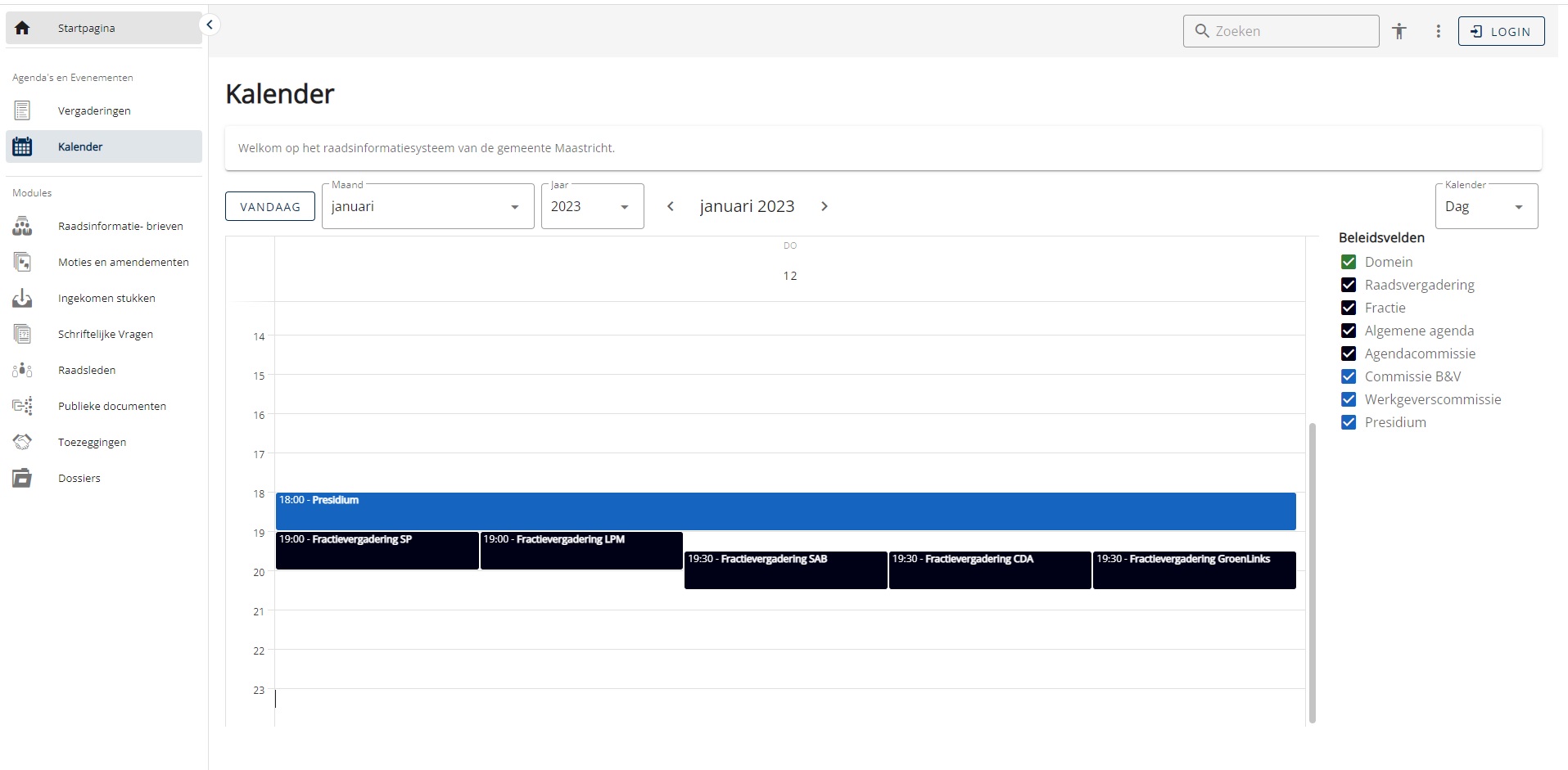
Impact: Hoog | Releasenummer: 1.52 | Jira ticketnummer: 1.52
Bekijk "[1.52] Meerdere evenementen correct getoond in dagoverzicht kalender"
[1.52] Sectie Onderhoud toegevoegd aan menu op homepage
VM 5678
Wanneer je applicatiebeheerder bent of rechten hebt tot het verrichten van onderhoudswerkzaamheden, tref je nu de sectie onderhoud aan als optie in het snelkiesmenu in de linkerbovenhoek van de startpagina wanneer je ingelogd bent.
Impact: Hoog | Releasenummer: 1.52 | Jira ticketnummer: 1.52
Bekijk "[1.52] Sectie Onderhoud toegevoegd aan menu op homepage"
[1.57 VM-4326] Verbreding Selectieveld toezeggingen
VM-4326
Om de leesbaarheid van commissienamen bij het aanmaken of bewerken van toezeggingen te vergroten, is de breedte van het selectieveld vergroot. Sommige commissienamen beginnen met dezelfde woorden, waardoor het onderscheid tussen de ene commissie en de andere soms niet te maken was.
Status: gereed | Impact: Hoog | Releasenummer: 1.57 | Jira ticketnummer: VM-4326
Bekijk "[1.57 VM-4326] Verbreding Selectieveld toezeggingen"
[1.58 VM-4798] Raadsperiode verliest spontaan info (bug)
VM-4798
Het kon gebeuren dat bepaalde instellingen of tekstgedeelten van de raadsperiode pagina niet correct getoond werden. Deze fix lost dit probleem op.
Status: Gereed | Impact: Midden | Releasenummer: 1.58 | Jira ticketnummer: VM-4798
beschikbaar op POC vanaf 11/05/2023
Bekijk "[1.58 VM-4798] Raadsperiode verliest spontaan info (bug)"
[1.58 VM-6090] Toevoegen multi-upload aan verslag
VM-6090
In het toevoegen van bijlagen aan een verslag was nog geen mogelijkheid beschikbaar om meerdere documenten tegelijk te uploaden. Dit is nu mogelijk gemaakt.
Status: Gereed | Impact: Midden | Releasenummer: 1.58 | Jira ticketnummer: VM-6090
beschikbaar op POC vanaf 11/05/2023
Bekijk "[1.58 VM-6090] Toevoegen multi-upload aan verslag"
[1.58 VM-6169] De 'lees antwoord' taak kan niet worden afgerond (bug)
VM-6169
Het kon voorkomen dat een ‘lees antwoord’ taak in de werklijst bleef staan en niet kon worden afgerond. Met deze fix wordt voorkomen dat dit nog kan optreden.
Status: Gereed | Impact: Midden | Releasenummer: 1.58 | Jira ticketnummer: VM-6169
beschikbaar op POC vanaf 11/05/2023
Bekijk "[1.58 VM-6169] De ‘lees antwoord’ taak kan niet worden afgerond (bug)"
[1.58 VM-6229] Zoeken in paginaheader genereert geen resultaten (bug)
VM-6229
Het kon gebeuren een zoekopdracht in het zoekveld in de header van de startpagina geen zoekresultaten gaf. Deze bug is met dit ticket opgelost.
Status: Gereed | Impact: Midden | Releasenummer: 1.58 | Jira ticketnummer: VM-6229
beschikbaar op POC vanaf 11/05/2023
Bekijk "[1.58 VM-6229] Zoeken in paginaheader genereert geen resultaten (bug)"
[1.58 VM-6237] Publiceren knop zichtbaar in onjuiste omstandigheden (bug)
VM-6237
Het kon voorkomen dat de publiceren knop zichtbaar was, ook wanneer de zichtbaarheid van de agenda was ingesteld op ‘Zichtbaar voor Griffie’. Dit was niet correct en deze bug is met dit ticket opgelost.
Status: Testing | Impact: Midden | Releasenummer: 1.58 | Jira ticketnummer: VM-6237
beschikbaar op POC vanaf 11/05/2023
Bekijk "[1.58 VM-6237] Publiceren knop zichtbaar in onjuiste omstandigheden (bug)"
[1.58 VM-6239] Agendawissel naar Zichtbaarheidsoverzicht (bug)
VM-6239
Het kon gebeuren dat je de zichtbaarheid van de agenda instelde op leden, zonder dat je daarmee naar het zichtbaarheidsoverzicht werd gebracht zoals dit bedoeld is. Dat overzicht is er zodat je kunt instellen wie wat mag zien en diverse details van de agenda verder te kunnen bewerken. Het automatisch naar die overzichtspagina gebracht worden vanuit de agenda zodra de zichtbaarheid ervan op leden wordt ingesteld, is bedoeld om kliks te besparen. Met de oplossing van dit ticket werkt dat weer.
Status: Gereed | Impact: Midden | Releasenummer: 1.58 | Jira ticketnummer: VM-6239
beschikbaar op POC vanaf 11/05/2023
Bekijk "[1.58 VM-6239] Agendawissel naar Zichtbaarheidsoverzicht (bug)"
[1.58 VM-6280] Incorrect aantal stemmingen op raadsperiode pagina (bug)
VM-6280
Het kon gebeuren dat wanneer je een raadslid bekeek op de raadsperiode pagina, dat daar niet het correcte totaalaantal stemmingen getoond werd. Wanneer je doorklikte op de stemming zelf tab, zag je daar wel het correcte totaalaantal. Dit betreft een bug die met dit ticket wordt opgelost.
Status: Gereed | Impact: Hoog | Releasenummer: 1.58 | Jira ticketnummer: VM-6280
beschikbaar op POC vanaf 11/05/2023
Bekijk "[1.58 VM-6280] Incorrect aantal stemmingen op raadsperiode pagina (bug)"
[1.58 VM-4996] Tekst-indicatie voor vertrouwelijke / niet-zichtbare documenten
VM-4996
Het kan voorkomen dat er bij de gemeente stukken binnenkomen waar publiek van gemeld moet worden dat ze ontvangen zijn, alleen die inhoudelijk niet beschikbaar gemaakt worden voor het publiek vanwege de vertrouwelijkheid. Om dit visueel toonbaar te maken bij de ingekomen stukken en het publiek te laten weten dat een document wel ontvangen is en bestaat, maar alleen door de raad ingezien kan worden, is er een configurabel vervangend tekstfragment geïntroduceerd dat dit communiceert. Dat wil zeggen dat in de configuratie ingesteld kan worden welke tekst men wil kiezen om te melden dat er een wel een stuk binnen is, maar dat dit vertrouwelijk is. Bijvoorbeeld ‘Document ontvangen – enkel zichtbaar voor raadsleden’.
Status: Gereed | Impact: Midden | Releasenummer: 1.58 | Jira ticketnummer: VM-4996
beschikbaar op POC vanaf 11/05/2023
Bekijk "[1.58 VM-4996] Tekst-indicatie voor vertrouwelijke / niet-zichtbare documenten"
[1.58 VM-6104] Aanpasbare aflever-deadline voor agenda
VM-6104
Met de introductie van deze nieuwe optie heeft een agendabeheerder handmatige controle over de levering van een dossier vanuit DossierFlow aan een agenda. Er kan een bepaald aantal uren ingesteld worden waarmee de levering dan wordt verzet. Dit urenaantal is na het opslaan ook zichtbaar.
Status: Gereed | Impact: Midden | Releasenummer: 1.58 | Jira ticketnummer: VM-6104
beschikbaar op POC vanaf 11/05/2023
Bekijk "[1.58 VM-6104] Aanpasbare aflever-deadline voor agenda"
[1.58 VM-6154] toelichtingen op toezeggingen gaan mee in export naar excel
VM-6154
Wanneer toezeggingen geëxporteerd werden naar een Excel bestand, werd daarbij de toelichting op de toezegging niet meegenomen. Dit ticket regelt dat de toelichtingen op toezeggingen meegenomen worden in de export format.
Status: Gereed | Impact: Midden | Releasenummer: 1.58 | Jira ticketnummer: VM-6154
beschikbaar op POC vanaf 11/05/2023
Bekijk "[1.58 VM-6154] toelichtingen op toezeggingen gaan mee in export naar excel"
[1.58 VM-6192] Excel export voor uitgebreide selectie van coordinator DossierFlow
VM-6192
Het was voor een DossierFlow coördinator nog niet mogelijk om een Excel export te maken van een uitgebreide selectie. Met dit ticket is het mogelijk gemaakt om exact dezelfde inhoud die je middels een uitgebreide selectie op het scherm krijgt ook te exporteren naar Excel.
Status: Gereed | Impact: Midden | Releasenummer: 1.58 | Jira ticketnummer: VM-6192
beschikbaar op POC vanaf 11/05/2023
Bekijk "[1.58 VM-6192] Excel export voor uitgebreide selectie van coordinator DossierFlow"
[1.58 VM-6276] Standaard zichtbaarheid voor historische informatie instelbaar
VM-6276
Wanneer je lid was van een bepaalde commissie was het niet vanzelfsprekend zo dat je alle historische informatie van de betreffende commissie uit voorgaande raadsperiodes ook kon zien. Met dit ticket is instelbaar gemaakt of dat historische data standaard wel of standaard niet gezien mogen worden bij het toekennen voor nieuwe lidmaatschappen. Tevens is de nieuwe standaard daarmee geworden dat de historische informatie wel gezien wordt. Wanneer niet gewenst is dat men historische informatie automatisch ziet, dan moet de instelling omgezet worden.
Status: Gereed | Impact: Midden | Releasenummer: 1.58 | Jira ticketnummer: VM-6276
beschikbaar op POC vanaf 11/05/2023
Bekijk "[1.58 VM-6276] Standaard zichtbaarheid voor historische informatie instelbaar"
[1.58 VM-6277] Startpagina standaardversie voor raadsleden
VM-6277
In plaats van dat je als raadslid naar de publieke versies van modules gestuurd wordt wanneer je vanuit een raadsledensectie terug navigeert naar de startpagina, kom je nu op een raadsledenstartpagina, waarbij agenda’s, evenementen en overige modules ingesteld staan op de raadsledenversies in plaats van de publieke versies.
Status: Gereed | Impact: Midden | Releasenummer: 1.58 | Jira ticketnummer: VM-6277
beschikbaar op POC vanaf 11/05/2023
Bekijk "[1.58 VM-6277] Startpagina standaardversie voor raadsleden"
[1.59 VM-6433] Knop naar acties-lijst collegeagenda werkt niet (bug)
VM-6433
Wanneer je als collegesecretariaat klikte op de Acties knop om naar de lijst met uitstaande acties te gaan, werd je teruggeleid naar de agenda. Met deze fix werkt de route naar de lijst weer correct.
Status: Gereed | Impact: Midden | Releasenummer: 1.59 | Sprintnummer: MM 23-09 | Jira ticketnummer: VM-6433
beschikbaar op POC vanaf 25/05/2023
Bekijk "[1.59 VM-6433] Knop naar acties-lijst collegeagenda werkt niet (bug)"
[1.59 VM-6379] Agenda overzicht toont enkel agenda's uit 2023 (bug)
VM-6379
Bij een bepaalde configuratie instelling kon het voorkomen dat het agenda overzicht enkel agenda’s toonde van het huidige jaar en voorgaande jaren pas getoond werden zodra je een commissie had geselecteerd. Deze fix zorgt ervoor dat het totaal jaaroverzicht altijd correct geladen wordt, onafhankelijk van de gekozen config instellingen.
Status: Gereed | Impact: Midden | Releasenummer: 1.59 | Sprintnummer: MM 23-09 | Jira ticketnummer: VM-6379
beschikbaar op POC vanaf 25/05/2023
Bekijk "[1.59 VM-6379] Agenda overzicht toont enkel agenda’s uit 2023 (bug)"
[1.59 VM-6362] Recht 'agendapuntmanager' toepassen bij 'beschikbaar voor griffie' (bug)
VM-6362
Het nieuw geintroduceerde recht ‘agendapuntmanager’ dat gebruikers de mogelijkheid geeft specifieke agendapunten te verwijderen kon aanvankelijk enkel ingezet worden wanneer de agenda ingesteld stond op ‘beschikbaar voor Leden’. Dit werkt nu ook correct wanneer de agenda enkel nog beschikbaar is voor de griffie.
Status: Gereed | Impact: Midden | Releasenummer: 1.59 | Sprintnummer: MM 23-09 | Jira ticketnummer: VM-6362
beschikbaar op POC vanaf 25/05/2023
Bekijk "[1.59 VM-6362] Recht ‘agendapuntmanager’ toepassen bij ‘beschikbaar voor griffie’ (bug)"
[1.59 VM-6355] Raadsperiode publiek opent in vorige periode
VM-6355
Wanneer je als burger naar de publieke Raadsperiode pagina ging, laadde deze aanvankelijk de vorige Raadsperiode wanneer er in het systeem sprake is van meerdere beschikbare periodes.
Status: Gereed | Impact: Midden | Releasenummer: 1.59 | Sprintnummer: MM 23-09 | Jira ticketnummer: VM-6355
beschikbaar op POC vanaf 25/05/2023
Bekijk "[1.59 VM-6355] Raadsperiode publiek opent in vorige periode"
[1.59 VM-6321] Oog-icoon in College Dagmap werkt niet (bug)
VM-6321
Wanneer je op het oog-icoon bij een agendapunt in een Dagmap van College klikte, werd je doorgestuurd naar de lijst. Dit is een bug die met dit ticket is opgelost. Wanneer je nu op het oog-icoon klikt, wordt correct de view van het agendapunt geopend.
Status: Gereed | Impact: Hoog | Releasenummer: 1.59 | Sprintnummer: MM 23-09 | Jira ticketnummer: VM-6321
beschikbaar op POC vanaf 25/05/2023
Bekijk "[1.59 VM-6321] Oog-icoon in College Dagmap werkt niet (bug)"
[1.59 VM-6155] Toelichting mee in Excel-export van Moties en amendementen
VM-6155
Wanneer je een Excel-export maakt van Moties en amendementen, worden de toelichtingen nu meegenomen in de export voor zowel Publiek als Raad.
Status: Gereed | Impact: Midden | Releasenummer: 1.59 | Sprintnummer: MM 23-09 | Jira ticketnummer: VM-6155
beschikbaar op POC vanaf 25/05/2023
Bekijk "[1.59 VM-6155] Toelichting mee in Excel-export van Moties en amendementen"
[1.59 VM-6112] Publiek zoeken op Raadsperiode pagina werkt niet (bug)
VM-6112
Wanneer je als Publiek een zoekopdracht gaf op de Raadsperiode pagina gaf dit een foutmelding. Nu werkt zoeken op de Raadsperiode pagina weer hetzelfde als elders in de website.
Status: Gereed | Impact: Midden | Releasenummer: 1.59 | Sprintnummer: MM 23-09 | Jira ticketnummer: VM-6112
beschikbaar op POC vanaf 25/05/2023
Bekijk "[1.59 VM-6112] Publiek zoeken op Raadsperiode pagina werkt niet (bug)"
[1.59 VM-5933] Kalender onthoudt filter-instellingen niet bij wisseling maand (bug)
VM-5933
Wanneer je Publiek een filter had toegepast op de kalender en vervolgens naar een andere maand navigeerde, kon de kalender de filter-instellingen niet onthouden, zodat je deze steeds opnieuw moest selecteren. Wanneer je nu een andere maand of een ander jaar selecteert, worden de filter-instellingen wel bewaard.
Status: Gereed | Impact: Midden | Releasenummer: 1.59 | Sprintnummer: MM 23-09 | Jira ticketnummer: VM-5933
beschikbaar op POC vanaf 25/05/2023
Bekijk "[1.59 VM-5933] Kalender onthoudt filter-instellingen niet bij wisseling maand (bug)"
[1.59 VM-5831] Weergave-mogelijkheid voor alle content in alle modules
VM-5831
Overal waar je binnen een module de zichtbaarheid van informatie in verschillende rijen kunt selecteren, is het nu mogelijk om alle beschikbare rijen ook gelijktijdig op het scherm naast elkaar zichtbaar te maken. Concreet betekent dit dat er een optie ‘alle’ is toegevoegd aan de selector voor zichtbaarheidsopties in alle modules waarop deze feature van toepassing is. Dit geldt zowel voor Raad als voor Publiek.
Status: Gereed | Impact: Midden | Releasenummer: 1.59 | Sprintnummer: MM 23-09 | Jira ticketnummer: VM-5831
beschikbaar op POC vanaf 25/05/2023
Bekijk "[1.59 VM-5831] Weergave-mogelijkheid voor alle content in alle modules"
[1.59 VOT-896] Video's downloadbaar voor Streamovations-integraties
VOT-896
De video streams op pagina’s waar de VOD-service gebruikt maakt van Streamovations bieden nu de mogelijkheid om de video te downloaden. Naast de social media buttons, is een knop ‘Download video’ toegevoegd.
Status: Gereed | Impact: Midden | Releasenummer: 1.59 | Sprintnummer: MM 23-09 | Jira ticketnummer: VOT-896
beschikbaar op POC vanaf 25/05/2023
Bekijk "[1.59 VOT-896] Video’s downloadbaar voor Streamovations-integraties"
